
Data Collection Forms
Lead capture forms collect valuable user information before or during agent interactions. The form is built into the Shared create flow (/shared/create) so every published agent can optionally gate its conversation behind a lightweight form.
Submitted leads stream into Insights → Leads where you can review and export them.
Form Configuration
Basic Setup
Open the Shared workspace, click + to start the create flow, scroll to Lead capture in the Persona step, and click Add lead capture form to open the modal.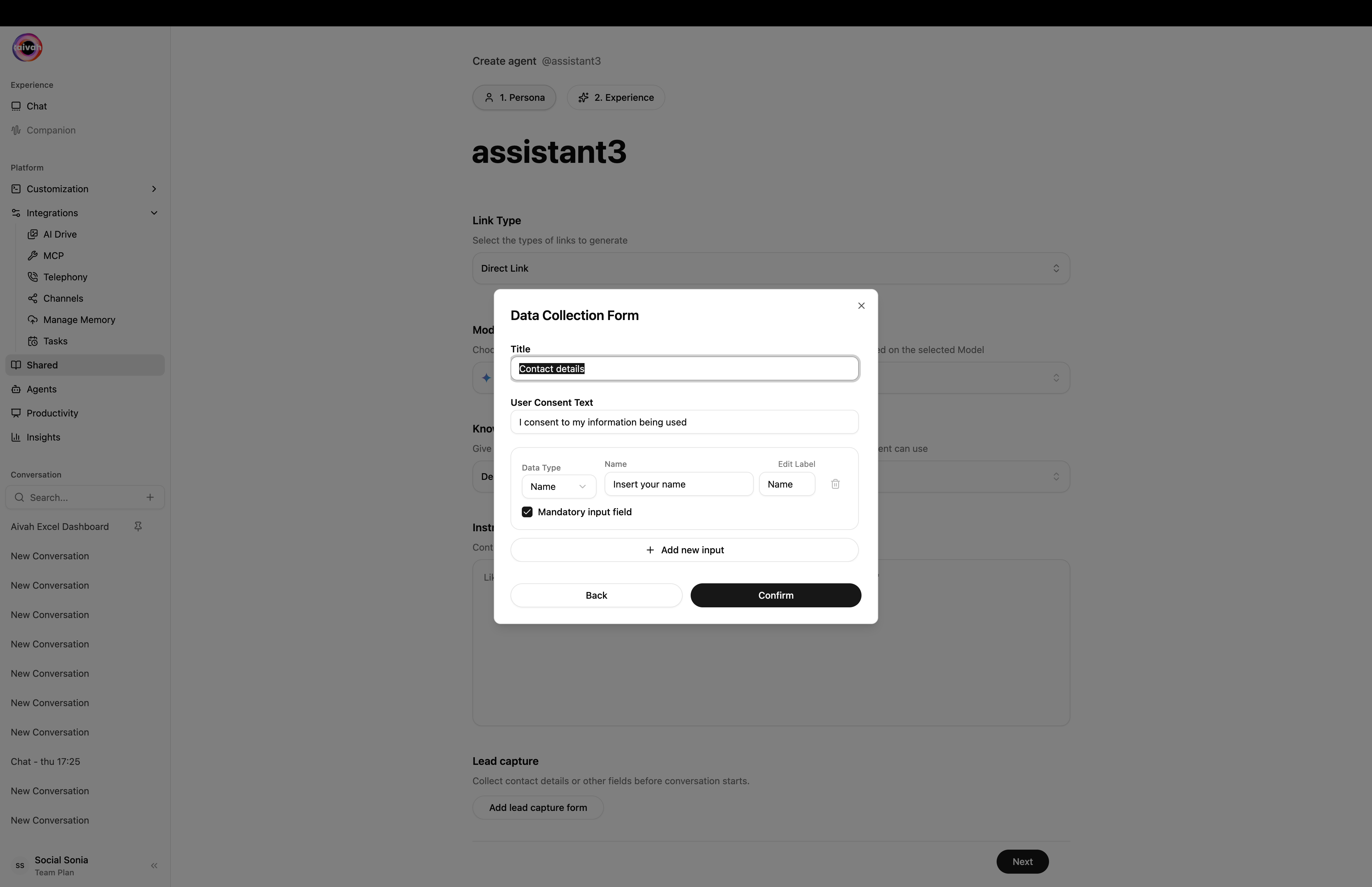
Data Collection Form modal – Title, User Consent Text, fields, and Add new input
Form Structure
- Title: Set a descriptive title for your form (e.g., “Contact details”)
- User Consent Text: Add privacy-compliant consent language
- Field Configuration: Define what information to collect (each entry has Data Type, Name placeholder, Edit Label, and a mandatory checkbox)
Field Types and Options
Standard Fields
- Name Field: Collect user names with customizable placeholder text
- Email Field: Capture email addresses for follow-up communications
- Phone Field: Capture a phone number with simple validation
- Custom Fields: Add any additional fields your use case requires
Field Configuration
Each field can be configured with:- Data Type: Name, Email, Phone, Text, Number, etc.
- Label: Display name for the field
- Placeholder Text: Helpful text shown before user input
- Mandatory Status: Mark required or optional
- Re-order: Drag-and-drop fields to change their order
- Remove: Delete fields that don’t apply
Advanced Field Settings
- Validation Rules: Ensure data quality and format compliance
- Conditional Logic: Show/hide fields based on previous responses
- Multi-step Forms: Break complex forms into manageable sections
User Experience Design
Form Presentation
- Modal Display: Forms appear as overlay dialogs
- Progressive Disclosure: Show fields as needed
- Clear Instructions: Guide users through the process
- Visual Feedback: Indicate progress and completion
Accessibility Features
- Clear Labels: All fields properly labeled
- Error Messaging: Helpful validation messages
- Keyboard Navigation: Full keyboard accessibility
- Screen Reader Support: ARIA labels and descriptions
Data Management
Collection Settings
- Required vs Optional: Balance data collection with user experience
- Privacy Compliance: Include necessary consent and privacy notices
- Data Validation: Ensure collected data meets quality standards
Integration Options
- CRM Integration: Connect to customer relationship management systems
- Email Marketing: Sync with email platforms for automated follow-ups
- Analytics Tracking: Monitor form completion rates and user behavior
Form Workflow
User Journey
- User encounters the agent
- Form appears at designated trigger point
- User completes required fields
- Form submission enables agent interaction
- Data is captured for follow-up
Trigger Options
- Pre-conversation: Collect data before agent access
- Mid-conversation: Capture information during natural breaks
- Post-conversation: Gather feedback and contact details after interaction
Best Practices
Form Design
- Minimal Fields: Only collect essential information
- Clear Value Proposition: Explain why you need the information
- Privacy Transparency: Be clear about data usage
- Mobile Optimization: Ensure forms work on all devices
- A/B Testing: Test different form configurations
Data Collection Ethics
- Explicit Consent: Always ask permission before collecting data
- Purpose Limitation: Only collect data you actually need
- Security: Protect user information appropriately
- User Control: Allow users to opt out or modify their data
Conversion Optimization
- Compelling Copy: Write persuasive form titles and descriptions
- Logical Flow: Order fields in a sensible sequence
- Error Prevention: Use validation to prevent common mistakes
- Success Feedback: Confirm successful form submission
Compliance Considerations
Privacy Regulations
- GDPR Compliance: Follow European data protection requirements
- CCPA Compliance: Meet California Consumer Privacy Act standards
- Industry Standards: Adhere to sector-specific regulations
Data Handling
- Secure Storage: Protect collected information
- Retention Policies: Define how long to keep user data
- User Rights: Support data access, correction, and deletion requests