> ## Documentation Index
> Fetch the complete documentation index at: https://opinionai.mintlify.site/llms.txt
> Use this file to discover all available pages before exploring further.
# Direct Link Sharing
> Share your AI agent through simple URLs that users can access directly
# Direct Link Distribution
Direct link sharing is the simplest way to distribute your AI agent. Users can access your agent immediately by clicking a URL, without any additional setup or installation required.
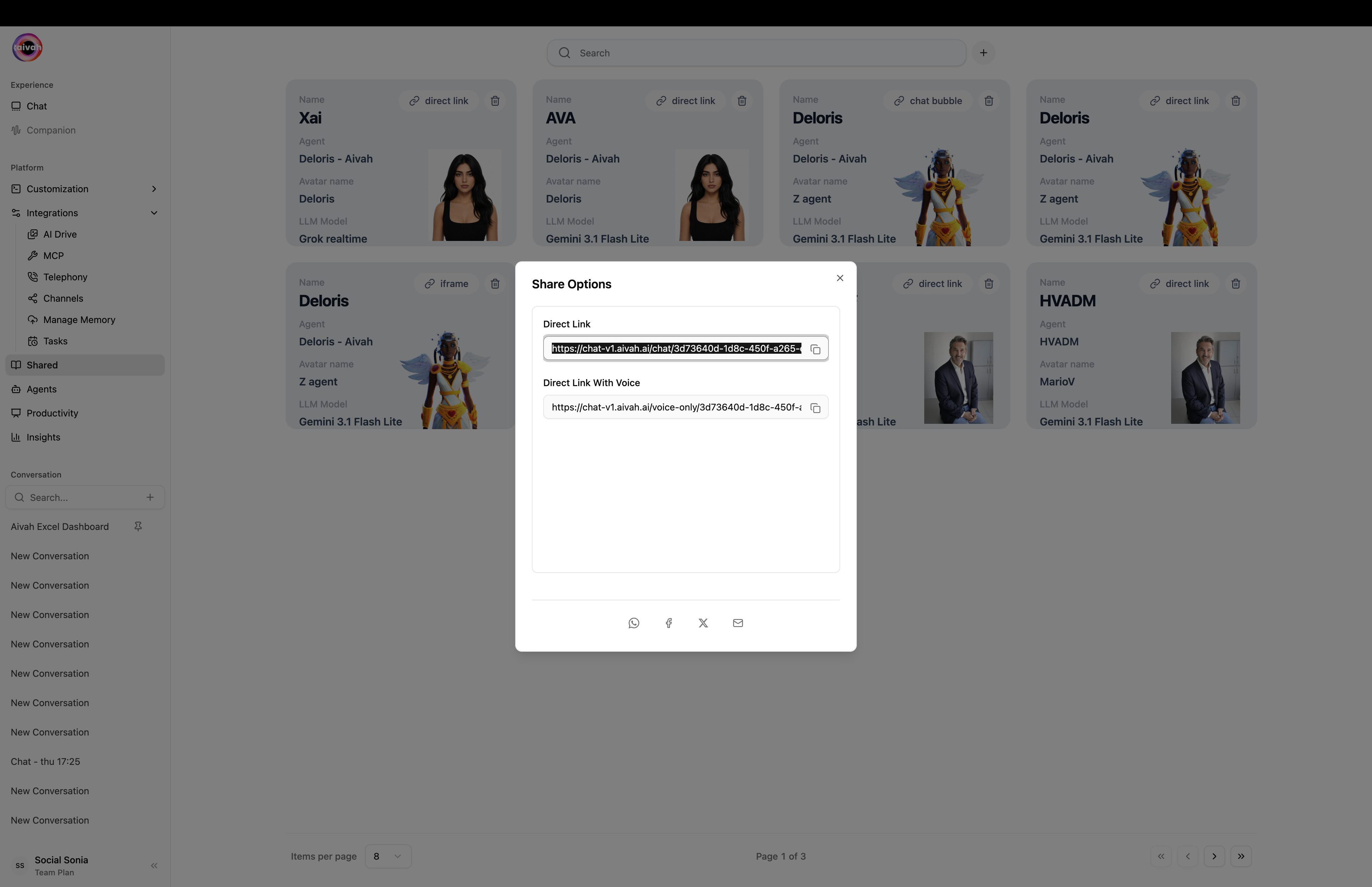 ## How Direct Links Work
### Basic Functionality
* **Instant Access**: Users click the link and immediately start interacting with your agent
* **No Installation**: Works directly in web browsers without additional software
* **Cross-Platform**: Compatible with desktop, mobile, and tablet devices
* **Shareable**: Easy to distribute via email, social media, or messaging platforms
### Link Structure
Direct links follow this format:
```
https://chat.aivah.ai/companion/[AGENT-ID]?type=face-focus
```
Where:
* `[AGENT-ID]`: Your unique agent identifier
* `?type=face-focus`: Optional parameter for display mode
## Link Customization Options
### Display Modes
* **Face Focus**: Close-up view emphasizing the avatar's face
* **Full Body**: Complete avatar view with background scene
* **Custom Scenes**: Specific environment settings
### URL Parameters
You can customize the user experience by adding parameters:
* `?type=face-focus`: Avatar focus mode
* `&scene=[SCENE-ID]`: Specific background scene
* `&theme=[THEME]`: Color theme preference
### Scene-Specific Links
Create links that load specific visual environments:
```
https://chat.aivah.ai/companion-scene/[AGENT-ID]?type=face-focus
```
## Sharing Methods
### Direct Distribution
* **Email Campaigns**: Include links in email newsletters or outreach
* **Social Media**: Share on LinkedIn, Twitter, Facebook, etc.
* **QR Codes**: Generate QR codes for offline marketing materials
* **Website Integration**: Add links to your existing website
### Marketing Integration
* **Campaign Tracking**: Use UTM parameters to track link performance
* **A/B Testing**: Test different link formats and messaging
* **Landing Pages**: Create dedicated pages that feature your agent links
* **Content Marketing**: Include links in blog posts, articles, and resources
## Social Media Sharing
### Built-in Social Sharing
The platform provides quick sharing options for:
## How Direct Links Work
### Basic Functionality
* **Instant Access**: Users click the link and immediately start interacting with your agent
* **No Installation**: Works directly in web browsers without additional software
* **Cross-Platform**: Compatible with desktop, mobile, and tablet devices
* **Shareable**: Easy to distribute via email, social media, or messaging platforms
### Link Structure
Direct links follow this format:
```
https://chat.aivah.ai/companion/[AGENT-ID]?type=face-focus
```
Where:
* `[AGENT-ID]`: Your unique agent identifier
* `?type=face-focus`: Optional parameter for display mode
## Link Customization Options
### Display Modes
* **Face Focus**: Close-up view emphasizing the avatar's face
* **Full Body**: Complete avatar view with background scene
* **Custom Scenes**: Specific environment settings
### URL Parameters
You can customize the user experience by adding parameters:
* `?type=face-focus`: Avatar focus mode
* `&scene=[SCENE-ID]`: Specific background scene
* `&theme=[THEME]`: Color theme preference
### Scene-Specific Links
Create links that load specific visual environments:
```
https://chat.aivah.ai/companion-scene/[AGENT-ID]?type=face-focus
```
## Sharing Methods
### Direct Distribution
* **Email Campaigns**: Include links in email newsletters or outreach
* **Social Media**: Share on LinkedIn, Twitter, Facebook, etc.
* **QR Codes**: Generate QR codes for offline marketing materials
* **Website Integration**: Add links to your existing website
### Marketing Integration
* **Campaign Tracking**: Use UTM parameters to track link performance
* **A/B Testing**: Test different link formats and messaging
* **Landing Pages**: Create dedicated pages that feature your agent links
* **Content Marketing**: Include links in blog posts, articles, and resources
## Social Media Sharing
### Built-in Social Sharing
The platform provides quick sharing options for:
 * **WhatsApp**: Direct messaging integration
* **Email**: mailto links with pre-filled content
* **LinkedIn**: Professional network sharing
* **Facebook**: Social media distribution
* **Twitter**: Tweet generation with your agent link
### Social Media Best Practices
1. **Compelling Descriptions**: Write engaging text to accompany your links
2. **Visual Assets**: Include screenshots or preview images
3. **Call-to-Action**: Clearly explain what users will get by clicking
4. **Hashtags**: Use relevant hashtags to increase discoverability
5. **Timing**: Share when your target audience is most active
## Link Management
### Analytics and Tracking
* **Click Tracking**: Monitor how many people access your agent
* **User Analytics**: Understand user behavior and engagement
* **Geographic Data**: See where your users are located
* **Device Information**: Track desktop vs mobile usage
### Link Organization
* **Multiple Versions**: Create different links for different campaigns
* **Custom Names**: Use memorable, branded URLs when possible
* **Documentation**: Keep records of where you've shared each link
* **Performance Monitoring**: Track which distribution channels work best
## Security and Access Control
### Public Access
* **Open Links**: Anyone with the link can access your agent
* **No Authentication**: Users don't need accounts to interact
* **Privacy Considerations**: Consider what information your agent might share
### Usage Monitoring
* **Traffic Analysis**: Monitor for unusual access patterns
* **Content Filtering**: Ensure your agent handles inappropriate requests
* **Rate Limiting**: Prevent abuse through excessive usage
## Technical Considerations
### Performance
* **Fast Loading**: Direct links provide immediate access
* **Mobile Optimization**: Links work seamlessly on mobile devices
* **Bandwidth**: Consider data usage for users on mobile networks
### Compatibility
* **Browser Support**: Works with all modern web browsers
* **Device Compatibility**: Functions on smartphones, tablets, and computers
* **Network Requirements**: Minimal bandwidth needed for basic functionality
## Best Practices
### Link Sharing Strategy
1. **Clear Context**: Always explain what the link leads to
2. **Value Proposition**: Highlight benefits of interacting with your agent
3. **Easy Discovery**: Make links easy to find and access
4. **Professional Presentation**: Use clean, professional messaging
5. **Regular Updates**: Keep shared links current and functional
### User Experience
* **Quick Access**: Minimize steps between link click and agent interaction
* **Clear Instructions**: Provide guidance on how to use the agent
* **Support Information**: Include contact details for help if needed
* **Feedback Collection**: Gather user feedback to improve the experience
Direct link sharing offers the fastest path from discovery to engagement with your AI agent.
* **WhatsApp**: Direct messaging integration
* **Email**: mailto links with pre-filled content
* **LinkedIn**: Professional network sharing
* **Facebook**: Social media distribution
* **Twitter**: Tweet generation with your agent link
### Social Media Best Practices
1. **Compelling Descriptions**: Write engaging text to accompany your links
2. **Visual Assets**: Include screenshots or preview images
3. **Call-to-Action**: Clearly explain what users will get by clicking
4. **Hashtags**: Use relevant hashtags to increase discoverability
5. **Timing**: Share when your target audience is most active
## Link Management
### Analytics and Tracking
* **Click Tracking**: Monitor how many people access your agent
* **User Analytics**: Understand user behavior and engagement
* **Geographic Data**: See where your users are located
* **Device Information**: Track desktop vs mobile usage
### Link Organization
* **Multiple Versions**: Create different links for different campaigns
* **Custom Names**: Use memorable, branded URLs when possible
* **Documentation**: Keep records of where you've shared each link
* **Performance Monitoring**: Track which distribution channels work best
## Security and Access Control
### Public Access
* **Open Links**: Anyone with the link can access your agent
* **No Authentication**: Users don't need accounts to interact
* **Privacy Considerations**: Consider what information your agent might share
### Usage Monitoring
* **Traffic Analysis**: Monitor for unusual access patterns
* **Content Filtering**: Ensure your agent handles inappropriate requests
* **Rate Limiting**: Prevent abuse through excessive usage
## Technical Considerations
### Performance
* **Fast Loading**: Direct links provide immediate access
* **Mobile Optimization**: Links work seamlessly on mobile devices
* **Bandwidth**: Consider data usage for users on mobile networks
### Compatibility
* **Browser Support**: Works with all modern web browsers
* **Device Compatibility**: Functions on smartphones, tablets, and computers
* **Network Requirements**: Minimal bandwidth needed for basic functionality
## Best Practices
### Link Sharing Strategy
1. **Clear Context**: Always explain what the link leads to
2. **Value Proposition**: Highlight benefits of interacting with your agent
3. **Easy Discovery**: Make links easy to find and access
4. **Professional Presentation**: Use clean, professional messaging
5. **Regular Updates**: Keep shared links current and functional
### User Experience
* **Quick Access**: Minimize steps between link click and agent interaction
* **Clear Instructions**: Provide guidance on how to use the agent
* **Support Information**: Include contact details for help if needed
* **Feedback Collection**: Gather user feedback to improve the experience
Direct link sharing offers the fastest path from discovery to engagement with your AI agent.