> ## Documentation Index
> Fetch the complete documentation index at: https://opinionai.mintlify.site/llms.txt
> Use this file to discover all available pages before exploring further.
# Chat Bubble Script Embed
> Add a floating chat bubble to any website using JavaScript embed code
# Chat Bubble Integration
The chat bubble embed allows you to add a floating chat interface to any website. Users can click the bubble to start conversations with your AI agent without leaving the current page.
 ## How Chat Bubbles Work
### Floating Interface
* **Non-intrusive Design**: Small bubble that doesn't interfere with website content
* **Always Accessible**: Positioned for easy access without blocking important elements
* **Expandable Interface**: Clicking opens a larger chat window
* **Contextual Help**: Users get assistance while browsing your content
### User Experience
* **Instant Availability**: Agent is ready to help at any moment
* **Seamless Integration**: Feels like a native part of your website
* **Mobile Responsive**: Works perfectly on all device sizes
* **Customizable Appearance**: Match your website's design and branding
## Implementation
### JavaScript Embed Code
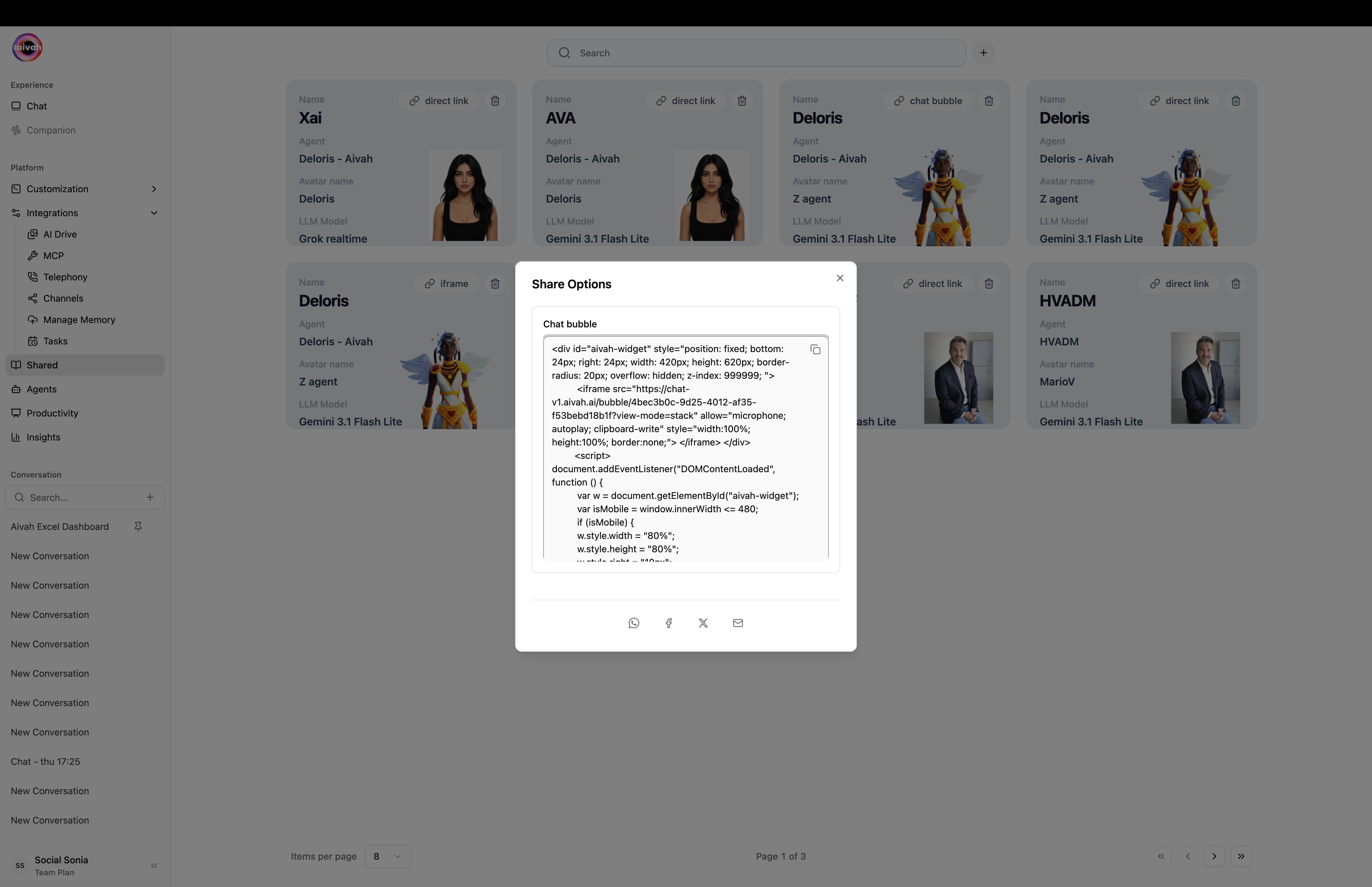
The platform generates JavaScript code that you can add to your website:
## How Chat Bubbles Work
### Floating Interface
* **Non-intrusive Design**: Small bubble that doesn't interfere with website content
* **Always Accessible**: Positioned for easy access without blocking important elements
* **Expandable Interface**: Clicking opens a larger chat window
* **Contextual Help**: Users get assistance while browsing your content
### User Experience
* **Instant Availability**: Agent is ready to help at any moment
* **Seamless Integration**: Feels like a native part of your website
* **Mobile Responsive**: Works perfectly on all device sizes
* **Customizable Appearance**: Match your website's design and branding
## Implementation
### JavaScript Embed Code
The platform generates JavaScript code that you can add to your website:
 ```html theme={null}
```
### Configuration Variables
The embed script uses several configuration variables:
* **window\.aivahUrl**: Avatar image URL for the bubble
* **window\.aivahBackground**: Background color for the bubble
* **window\.baseUrl**: Base URL for the chat interface
* **window\.contentUrl**: Direct link to your agent with bubble view type
## Customization Options
### Visual Appearance
* **Avatar Image**: Use your agent's avatar in the bubble
* **Background Color**: Match your website's color scheme
* **Bubble Size**: Adjust dimensions to fit your design
* **Position**: Choose corner placement (typically bottom-right)
### Behavioral Settings
* **Auto-open**: Configure if bubble should open automatically
* **Trigger Timing**: Set when the bubble becomes active
* **Animation Effects**: Control how the bubble appears and behaves
* **Click Behavior**: Define what happens when users interact
## Installation Process
### Step 1: Generate Code
1. Configure your agent's behavior and appearance
2. Navigate to the Share section
3. Select "Chat bubble" as distribution method
4. Copy the provided JavaScript code
### Step 2: Website Integration
1. Paste the code before the closing `` tag
2. Test the implementation on a staging environment
3. Verify mobile responsiveness
4. Check that the bubble doesn't interfere with existing functionality
### Step 3: Optimization
1. Monitor performance impact
2. Test user interactions
3. Adjust positioning if needed
4. Configure any additional settings
## Technical Considerations
### Performance Impact
* **Lightweight Script**: Minimal impact on page load times
* **Lazy Loading**: Agent interface loads only when needed
* **CDN Delivery**: Script served from optimized content delivery network
* **Caching**: Efficient caching for return visitors
### Compatibility
* **Modern Browsers**: Works with all current web browsers
* **Mobile Support**: Full functionality on smartphones and tablets
* **Framework Agnostic**: Compatible with any website technology
* **CMS Integration**: Works with WordPress, Shopify, and other platforms
### Security
* **Secure Delivery**: All scripts served over HTTPS
* **Content Security Policy**: Compatible with CSP implementations
* **No Data Collection**: Script doesn't collect website visitor data
* **Privacy Compliant**: Respects user privacy preferences
## Customization Best Practices
### Design Integration
1. **Brand Consistency**: Match bubble colors to your brand palette
2. **Visual Hierarchy**: Ensure bubble doesn't compete with important elements
3. **Accessibility**: Maintain sufficient color contrast and size
4. **Mobile Optimization**: Test thoroughly on mobile devices
### User Experience
* **Clear Purpose**: Make it obvious what the bubble does
* **Appropriate Timing**: Don't overwhelm users immediately on arrival
* **Help Context**: Position bubble where users might need assistance
* **Fallback Options**: Provide alternative contact methods
## Use Cases
### Customer Support
* **24/7 Availability**: Provide instant help outside business hours
* **Common Questions**: Handle frequently asked questions automatically
* **Escalation Path**: Direct complex issues to human agents
* **Support Documentation**: Help users find relevant information
### Lead Generation
* **Qualification**: Ask qualifying questions to identify prospects
* **Information Collection**: Gather contact details for follow-up
* **Product Demos**: Offer interactive product demonstrations
* **Meeting Scheduling**: Help visitors book appointments
### Content Assistance
* **Navigation Help**: Guide users to relevant content
* **Product Recommendations**: Suggest appropriate products or services
* **FAQ Responses**: Answer common questions about your offerings
* **Process Guidance**: Walk users through complex procedures
## Monitoring and Analytics
### Performance Metrics
* **Bubble Clicks**: Track how often users engage with the bubble
* **Conversation Starts**: Monitor successful chat initiations
* **User Satisfaction**: Collect feedback on chat experiences
* **Conversion Tracking**: Measure impact on business goals
### Optimization Strategies
* **A/B Testing**: Test different bubble designs and positions
* **Usage Patterns**: Analyze when users are most likely to engage
* **Content Effectiveness**: Evaluate which responses work best
* **Technical Performance**: Monitor load times and error rates
The chat bubble embed provides an excellent way to offer AI assistance without disrupting the user's browsing experience.
```html theme={null}
```
### Configuration Variables
The embed script uses several configuration variables:
* **window\.aivahUrl**: Avatar image URL for the bubble
* **window\.aivahBackground**: Background color for the bubble
* **window\.baseUrl**: Base URL for the chat interface
* **window\.contentUrl**: Direct link to your agent with bubble view type
## Customization Options
### Visual Appearance
* **Avatar Image**: Use your agent's avatar in the bubble
* **Background Color**: Match your website's color scheme
* **Bubble Size**: Adjust dimensions to fit your design
* **Position**: Choose corner placement (typically bottom-right)
### Behavioral Settings
* **Auto-open**: Configure if bubble should open automatically
* **Trigger Timing**: Set when the bubble becomes active
* **Animation Effects**: Control how the bubble appears and behaves
* **Click Behavior**: Define what happens when users interact
## Installation Process
### Step 1: Generate Code
1. Configure your agent's behavior and appearance
2. Navigate to the Share section
3. Select "Chat bubble" as distribution method
4. Copy the provided JavaScript code
### Step 2: Website Integration
1. Paste the code before the closing `` tag
2. Test the implementation on a staging environment
3. Verify mobile responsiveness
4. Check that the bubble doesn't interfere with existing functionality
### Step 3: Optimization
1. Monitor performance impact
2. Test user interactions
3. Adjust positioning if needed
4. Configure any additional settings
## Technical Considerations
### Performance Impact
* **Lightweight Script**: Minimal impact on page load times
* **Lazy Loading**: Agent interface loads only when needed
* **CDN Delivery**: Script served from optimized content delivery network
* **Caching**: Efficient caching for return visitors
### Compatibility
* **Modern Browsers**: Works with all current web browsers
* **Mobile Support**: Full functionality on smartphones and tablets
* **Framework Agnostic**: Compatible with any website technology
* **CMS Integration**: Works with WordPress, Shopify, and other platforms
### Security
* **Secure Delivery**: All scripts served over HTTPS
* **Content Security Policy**: Compatible with CSP implementations
* **No Data Collection**: Script doesn't collect website visitor data
* **Privacy Compliant**: Respects user privacy preferences
## Customization Best Practices
### Design Integration
1. **Brand Consistency**: Match bubble colors to your brand palette
2. **Visual Hierarchy**: Ensure bubble doesn't compete with important elements
3. **Accessibility**: Maintain sufficient color contrast and size
4. **Mobile Optimization**: Test thoroughly on mobile devices
### User Experience
* **Clear Purpose**: Make it obvious what the bubble does
* **Appropriate Timing**: Don't overwhelm users immediately on arrival
* **Help Context**: Position bubble where users might need assistance
* **Fallback Options**: Provide alternative contact methods
## Use Cases
### Customer Support
* **24/7 Availability**: Provide instant help outside business hours
* **Common Questions**: Handle frequently asked questions automatically
* **Escalation Path**: Direct complex issues to human agents
* **Support Documentation**: Help users find relevant information
### Lead Generation
* **Qualification**: Ask qualifying questions to identify prospects
* **Information Collection**: Gather contact details for follow-up
* **Product Demos**: Offer interactive product demonstrations
* **Meeting Scheduling**: Help visitors book appointments
### Content Assistance
* **Navigation Help**: Guide users to relevant content
* **Product Recommendations**: Suggest appropriate products or services
* **FAQ Responses**: Answer common questions about your offerings
* **Process Guidance**: Walk users through complex procedures
## Monitoring and Analytics
### Performance Metrics
* **Bubble Clicks**: Track how often users engage with the bubble
* **Conversation Starts**: Monitor successful chat initiations
* **User Satisfaction**: Collect feedback on chat experiences
* **Conversion Tracking**: Measure impact on business goals
### Optimization Strategies
* **A/B Testing**: Test different bubble designs and positions
* **Usage Patterns**: Analyze when users are most likely to engage
* **Content Effectiveness**: Evaluate which responses work best
* **Technical Performance**: Monitor load times and error rates
The chat bubble embed provides an excellent way to offer AI assistance without disrupting the user's browsing experience.