> ## Documentation Index
> Fetch the complete documentation index at: https://opinionai.mintlify.site/llms.txt
> Use this file to discover all available pages before exploring further.
# Overview
> Centralize account, billing, and resource management settings
# Platform Setup Overview
The **Platform Setup** area houses everything you need to manage your Aivah workspace—from personal account details to billing, credits, and onboarding resources. Each section in the left-hand navigation maps directly to a settings card inside the product. Use the guide below to understand what lives where and when to visit each page.
## Sections at a Glance
| Section | Purpose |
| ---------------------------------------------- | ----------------------------------------------------------------------------------------------------- |
| [User Settings](/platform-setup/user-settings) | Update your profile photo, cover image, display name, and password. |
| [Credits](/platform-setup/credits) | Check your remaining credits and purchase one-off packages (2K / 5K / 10K / 20K / 30K / 40K credits). |
| [Subscriptions](/platform-setup/subscriptions) | Switch monthly vs yearly cycle, compare plans, and start Stripe checkout. |
| [Billing](/platform-setup/billing) | Launch the Stripe customer portal to manage payment methods, invoices, and cancellations. |
| [Documentation](/platform-setup/documentation) | Launch an interactive Storylane tour that walks through key product features. |
| [Support](/platform-setup/support) | Reach the Aivah team for help that isn't covered by the self-service docs. |
## User menu shortcuts
The user menu at the bottom of the side navigation is the fastest way to access account and billing settings without leaving the page you're on:
* **Upgrade to Pro** – jumps to `/subscription`.
* **Add credit** – opens the **Buy Credits** dialog (see [Credits](/platform-setup/credits)).
* **Account** – profile shortcut.
* **Billing** – opens the Stripe billing dashboard in a new tab.
* **Theme** – switches between *System*, *Light*, and *Dark*.
* **Log out** – clears the session and returns to `/login`.
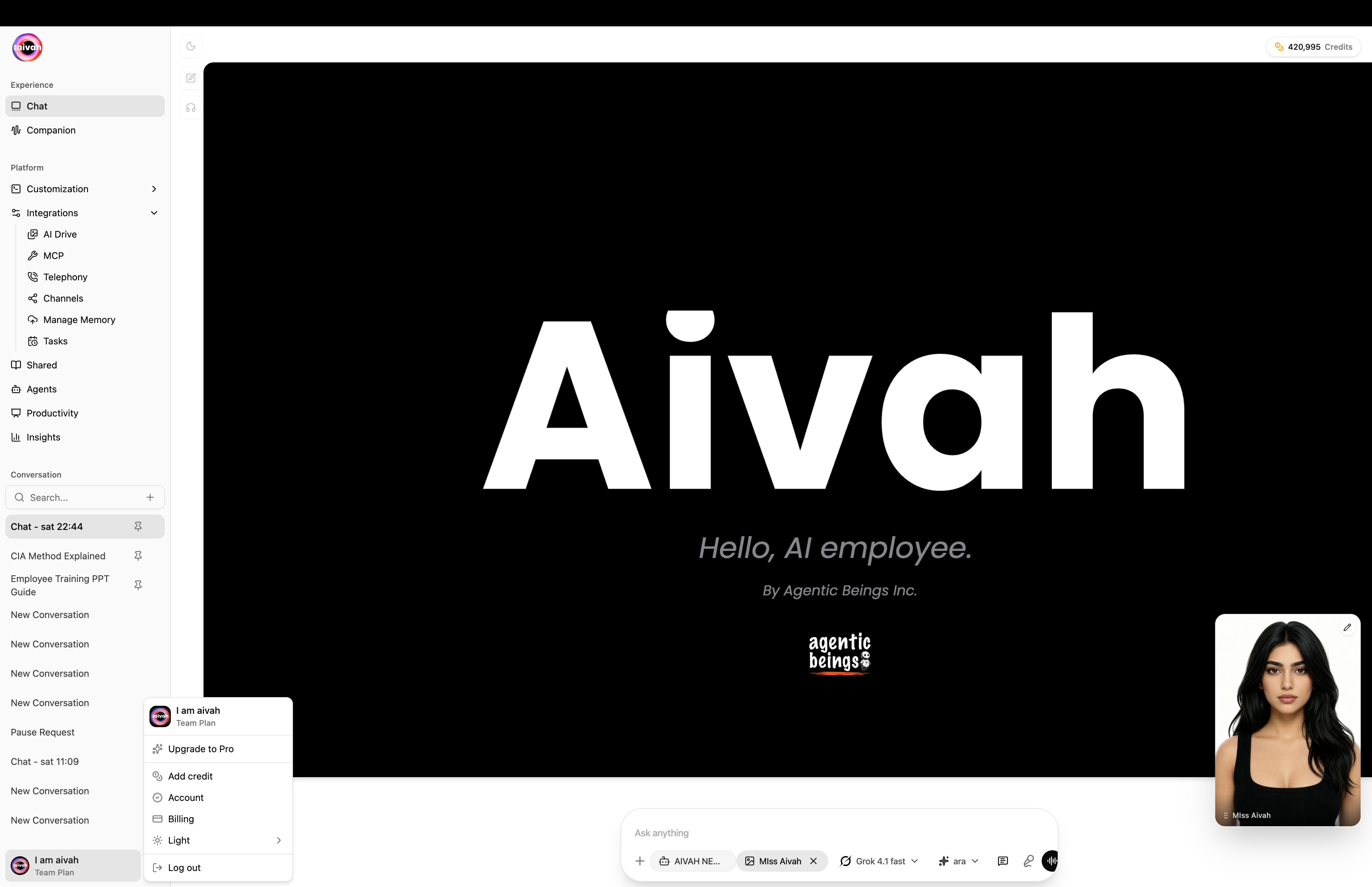 The side navigation also exposes other workspaces (Avatars, Characters, Voices, Agents, Productivity, Shared, Integrations, Insights). Those areas are covered in their own guides.
## Suggested Workflow
1. **Start with User Settings** to ensure your profile and security details are current.
2. **Check Subscription and Credits** so you understand your plan limits before inviting teammates.
3. **Configure Billing** by opening the billing dashboard and verifying payment methods.
4. **Launch the Documentation tour** if you or new teammates need an interactive walkthrough.
5. **Monitor credits regularly**—return to the Credits page whenever you need to top up usage.
## Quick Tips
* Keep profile images current; they appear in shared experiences and dashboards.
* Note your subscription renewal date so you can plan upgrades or pauses in advance.
* Download invoices monthly for your finance team; the billing portal retains history but proactive downloads simplify bookkeeping.
* Watch for the API Key section to go live if you plan to connect custom applications.
Use the individual pages linked above for deeper, task-specific instructions.
The side navigation also exposes other workspaces (Avatars, Characters, Voices, Agents, Productivity, Shared, Integrations, Insights). Those areas are covered in their own guides.
## Suggested Workflow
1. **Start with User Settings** to ensure your profile and security details are current.
2. **Check Subscription and Credits** so you understand your plan limits before inviting teammates.
3. **Configure Billing** by opening the billing dashboard and verifying payment methods.
4. **Launch the Documentation tour** if you or new teammates need an interactive walkthrough.
5. **Monitor credits regularly**—return to the Credits page whenever you need to top up usage.
## Quick Tips
* Keep profile images current; they appear in shared experiences and dashboards.
* Note your subscription renewal date so you can plan upgrades or pauses in advance.
* Download invoices monthly for your finance team; the billing portal retains history but proactive downloads simplify bookkeeping.
* Watch for the API Key section to go live if you plan to connect custom applications.
Use the individual pages linked above for deeper, task-specific instructions.