> ## Documentation Index
> Fetch the complete documentation index at: https://opinionai.mintlify.site/llms.txt
> Use this file to discover all available pages before exploring further.
# Hub Scenes
> Immersive 3D environments for enhanced avatar interactions
# Hub Scenes
Transform your avatar interactions with immersive 3D scenes designed for different use cases. Each scene provides unique environments and interactive elements that enhance communication with your AI agents.
## Scene Selection
Access scenes through the **paint brush icon** in the bottom left corner of the Hub. Click to open the scene selection menu and choose from multiple interactive environments.
## Available Scenes
### Standard Scene
Clean, professional environment for general interactions.
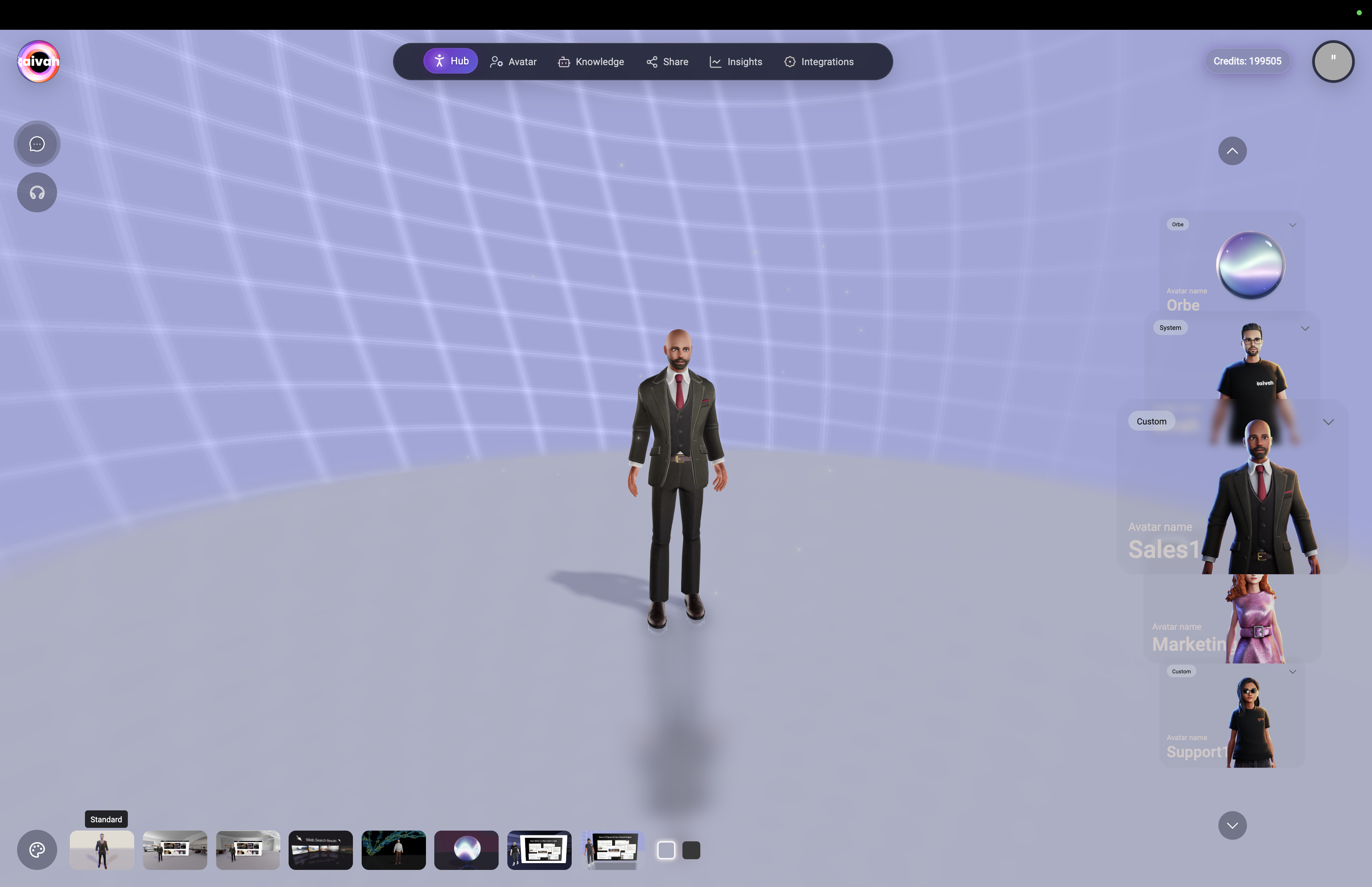 *Standard professional environment with grid background and clean presentation*
**Features:**
* **Professional Setting**: Clean, distraction-free environment
* **Universal Compatibility**: Works with all avatar types and interaction modes
* **Optimal Performance**: Lightweight scene for fast loading
* **Business Focused**: Ideal for professional conversations and demonstrations
**Best Use Cases:**
* General business conversations
* Professional consultations
* Knowledge-based Q\&A sessions
* First-time user interactions
### Zen Scene 1 - Interactive Widget
Zen environment with interactive website/content display widget.
*Standard professional environment with grid background and clean presentation*
**Features:**
* **Professional Setting**: Clean, distraction-free environment
* **Universal Compatibility**: Works with all avatar types and interaction modes
* **Optimal Performance**: Lightweight scene for fast loading
* **Business Focused**: Ideal for professional conversations and demonstrations
**Best Use Cases:**
* General business conversations
* Professional consultations
* Knowledge-based Q\&A sessions
* First-time user interactions
### Zen Scene 1 - Interactive Widget
Zen environment with interactive website/content display widget.
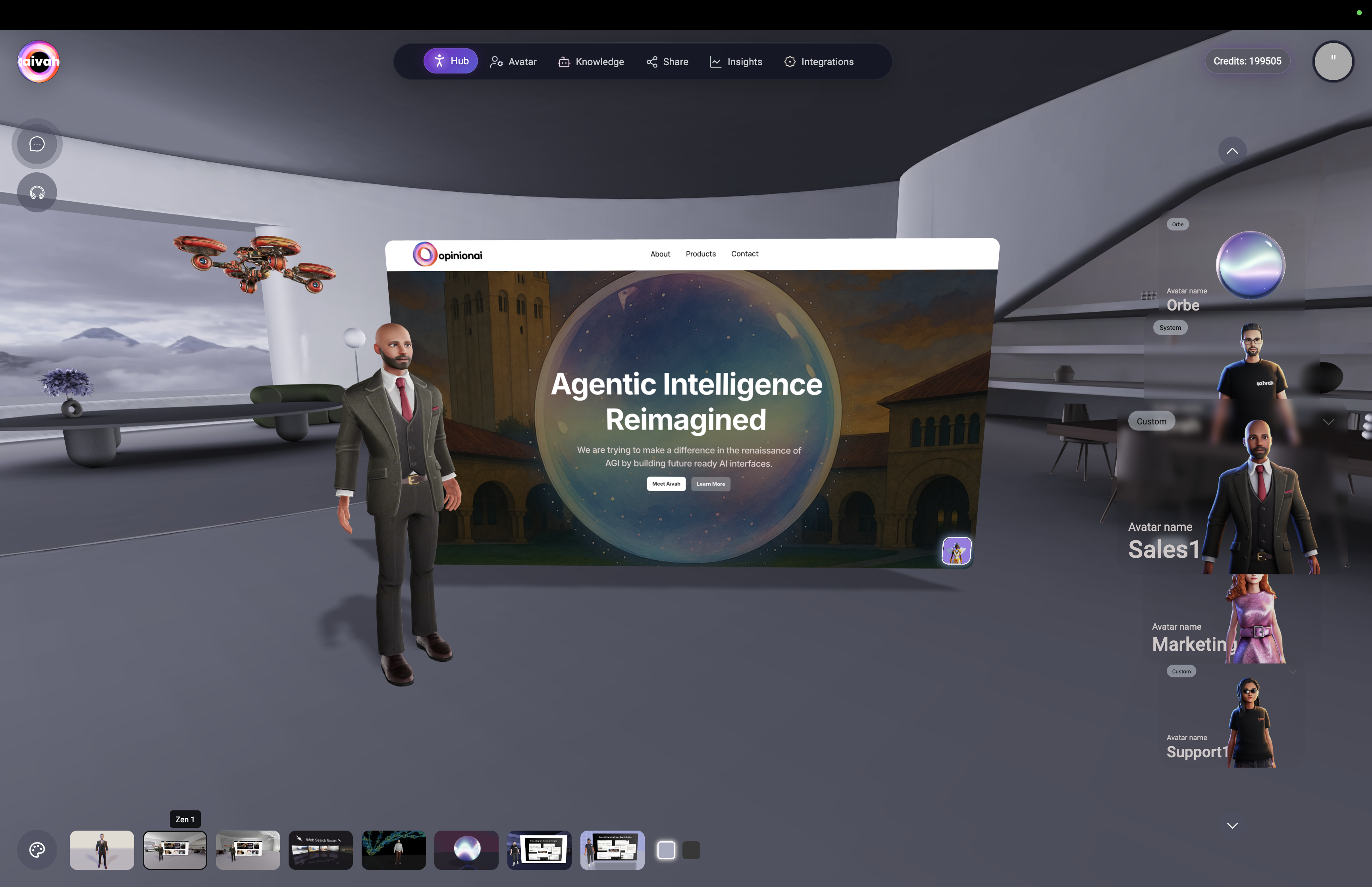 *Zen Scene 1 with integrated interactive widget for displaying web content*
**Interactive Features:**
* **Website Display**: Show live websites sourced from your Worker Agents
* **YouTube Integration**: Play YouTube videos while maintaining conversation
* **Presentation Viewer**: Display uploaded presentations with agent commentary
* **Responsive Widget**: Adjusts to different content types automatically
**Best Use Cases:**
* Product demonstrations with live websites
* Educational content with video integration
* Presentation delivery with visual aids
* Interactive training sessions
### Zen Scene 2 - Interactive Widget
Alternative zen environment with interactive content capabilities.
*Zen Scene 1 with integrated interactive widget for displaying web content*
**Interactive Features:**
* **Website Display**: Show live websites sourced from your Worker Agents
* **YouTube Integration**: Play YouTube videos while maintaining conversation
* **Presentation Viewer**: Display uploaded presentations with agent commentary
* **Responsive Widget**: Adjusts to different content types automatically
**Best Use Cases:**
* Product demonstrations with live websites
* Educational content with video integration
* Presentation delivery with visual aids
* Interactive training sessions
### Zen Scene 2 - Interactive Widget
Alternative zen environment with interactive content capabilities.
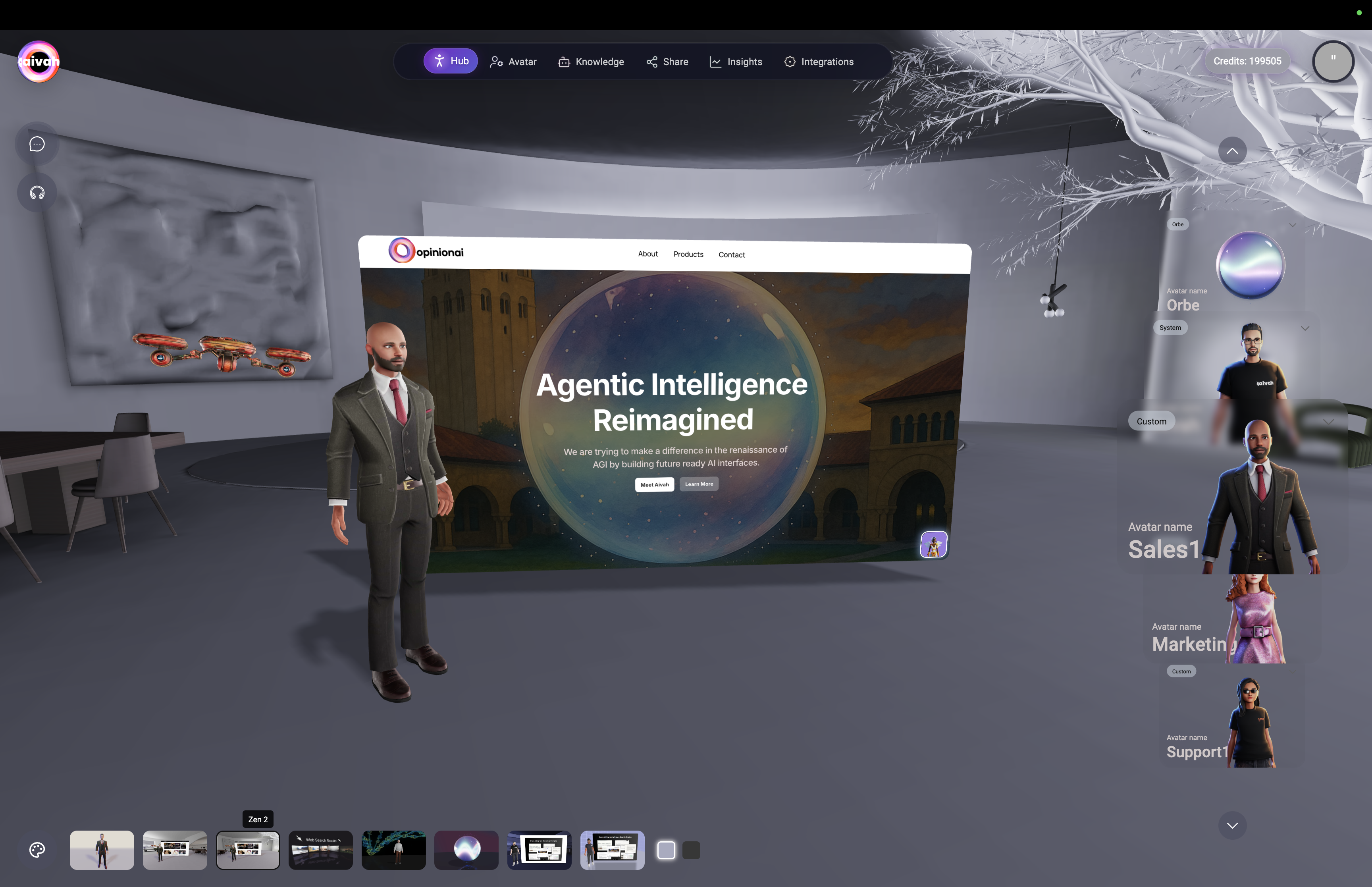 *Zen Scene 2 offering another perspective for interactive content display*
**Interactive Features:**
* **Alternative View**: Different visual perspective for content display
* **Multi-Content Support**: Websites, videos, presentations
* **Enhanced Immersion**: Varied environment for longer sessions
* **Content Integration**: Seamless blend of conversation and visual content
**Best Use Cases:**
* Extended interactive sessions
* Multi-media presentations
* Varied content demonstrations
* Alternative viewing preference
### Web Search Scene - Interactive Smart Widgets
Immersive environment where web search results appear as 3D widgets around the agent.
*Zen Scene 2 offering another perspective for interactive content display*
**Interactive Features:**
* **Alternative View**: Different visual perspective for content display
* **Multi-Content Support**: Websites, videos, presentations
* **Enhanced Immersion**: Varied environment for longer sessions
* **Content Integration**: Seamless blend of conversation and visual content
**Best Use Cases:**
* Extended interactive sessions
* Multi-media presentations
* Varied content demonstrations
* Alternative viewing preference
### Web Search Scene - Interactive Smart Widgets
Immersive environment where web search results appear as 3D widgets around the agent.
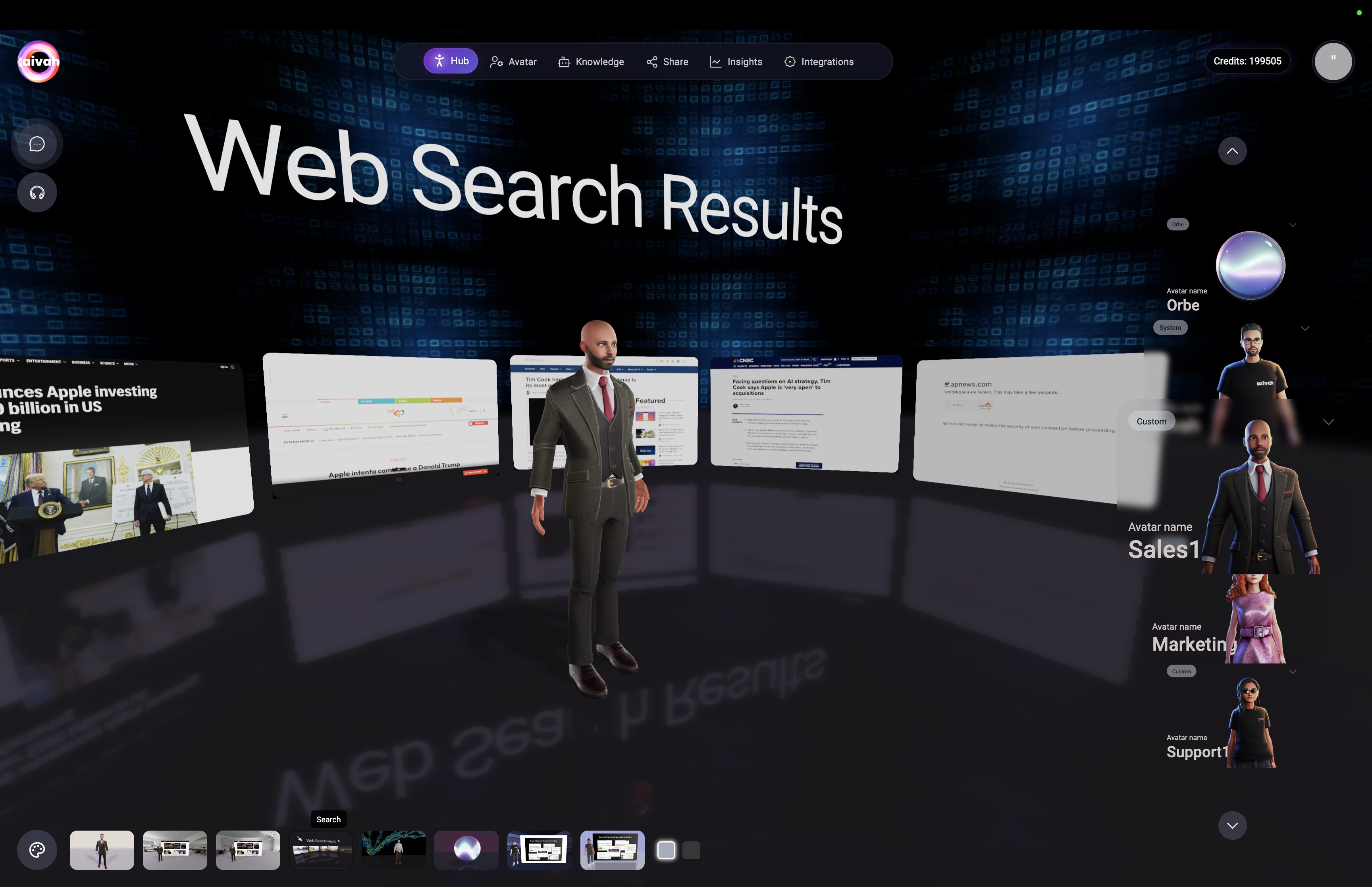 *Web Search Scene with interactive widgets displaying cited sources spatially around the agent*
**Interactive Features:**
* **Immersive Search Results**: Web search results displayed as 3D widgets
* **Clickable Sources**: Click widgets to open cited sources in new tabs
* **Spatial Arrangement**: Results positioned contextually around agent
* **Real-Time Updates**: New searches instantly populate the environment
**Best Use Cases:**
* Research assistance and fact-finding
* Real-time information gathering
* Source verification and citation
* Educational research sessions
**How to Use:**
1. Activate Web Search Scene
2. Ask agent to perform web searches
3. Watch results appear as interactive widgets
4. Click widgets to access full source pages
### Video Wall Scene
Customizable video background environment with upload capabilities.
*Web Search Scene with interactive widgets displaying cited sources spatially around the agent*
**Interactive Features:**
* **Immersive Search Results**: Web search results displayed as 3D widgets
* **Clickable Sources**: Click widgets to open cited sources in new tabs
* **Spatial Arrangement**: Results positioned contextually around agent
* **Real-Time Updates**: New searches instantly populate the environment
**Best Use Cases:**
* Research assistance and fact-finding
* Real-time information gathering
* Source verification and citation
* Educational research sessions
**How to Use:**
1. Activate Web Search Scene
2. Ask agent to perform web searches
3. Watch results appear as interactive widgets
4. Click widgets to access full source pages
### Video Wall Scene
Customizable video background environment with upload capabilities.
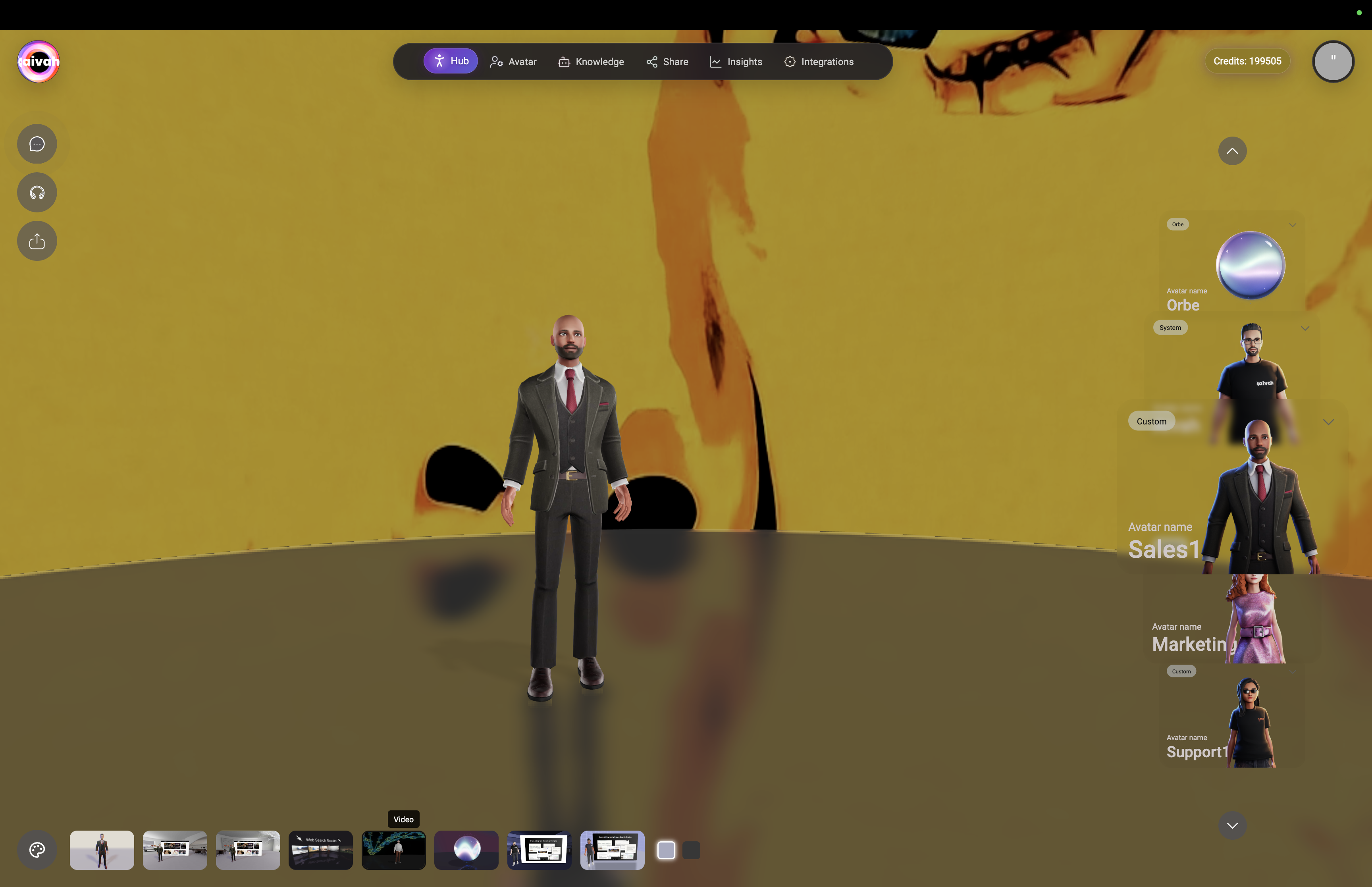 *Video Wall Scene with upload dialog for custom video backgrounds*
**Interactive Features:**
* **Custom Video Upload**: Upload MP4 files under 50MB
* **Video Background**: Videos play while maintaining agent interaction
* **Upload Controls**: Access upload button near chat/talk controls
* **System Default**: Default video plays when no custom video uploaded
**Technical Requirements:**
* **Format**: MP4 video files only
* **Size Limit**: Maximum 50MB file size
* **Upload Location**: Button appears near top-left interaction controls
**Best Use Cases:**
* Branded presentations with company videos
* Product demonstrations with background context
* Training sessions with relevant video content
* Marketing presentations with promotional videos
### Presenter Agent Scene 1 - Interactive
Interactive presentation environment where Presenter Agents control slide progression.
*Video Wall Scene with upload dialog for custom video backgrounds*
**Interactive Features:**
* **Custom Video Upload**: Upload MP4 files under 50MB
* **Video Background**: Videos play while maintaining agent interaction
* **Upload Controls**: Access upload button near chat/talk controls
* **System Default**: Default video plays when no custom video uploaded
**Technical Requirements:**
* **Format**: MP4 video files only
* **Size Limit**: Maximum 50MB file size
* **Upload Location**: Button appears near top-left interaction controls
**Best Use Cases:**
* Branded presentations with company videos
* Product demonstrations with background context
* Training sessions with relevant video content
* Marketing presentations with promotional videos
### Presenter Agent Scene 1 - Interactive
Interactive presentation environment where Presenter Agents control slide progression.
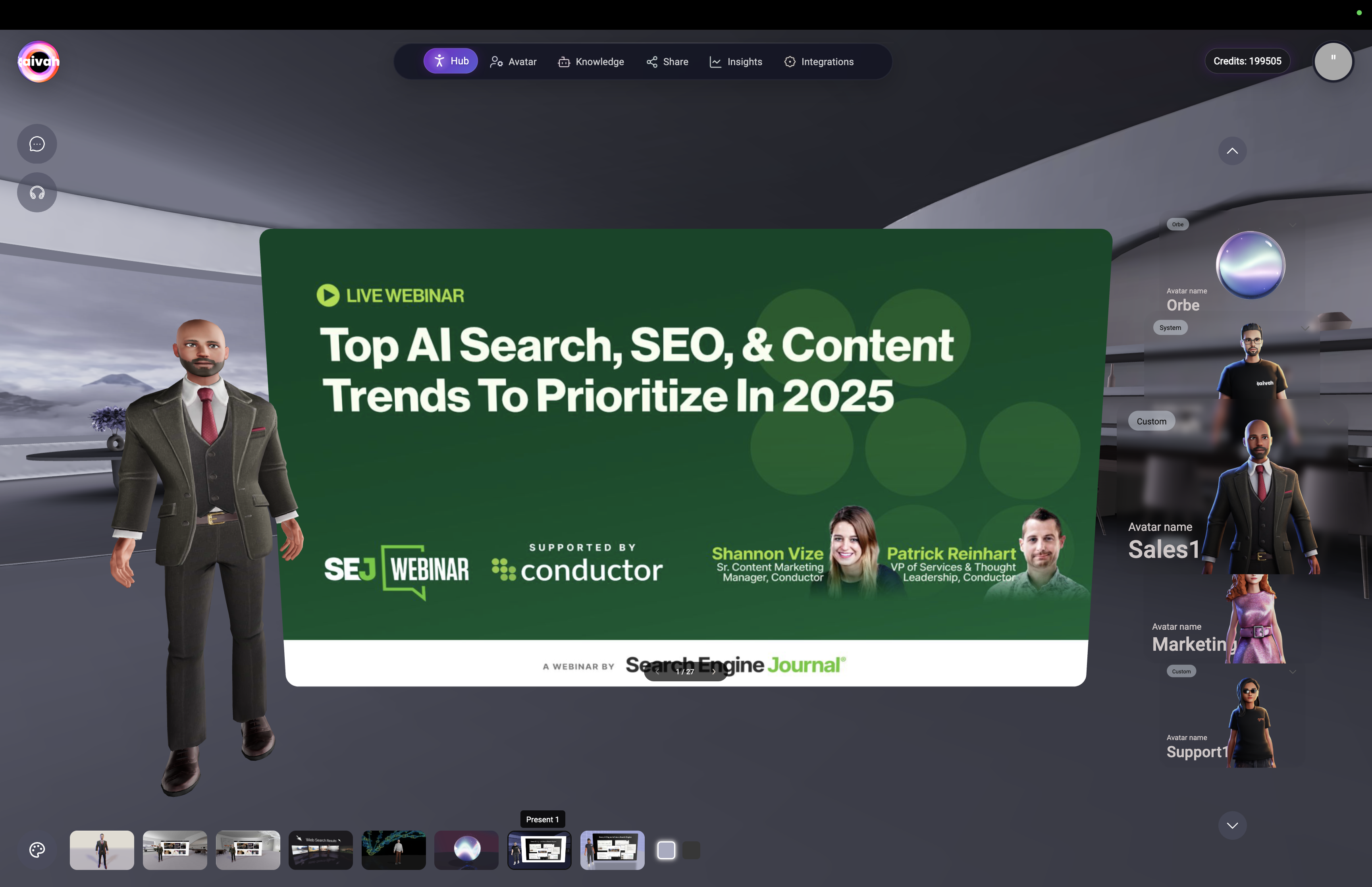 *Presentation Scene 1 with interactive slide display and agent-controlled navigation*
**Interactive Features:**
* **PDF Integration**: Display uploaded PDF presentations
* **Agent Control**: Agent automatically advances slides based on content
* **Interactive Navigation**: Ask agent to move to specific slides or pages
* **Content Awareness**: Slides change dynamically with conversation context
**Best Use Cases:**
* Sales presentations with agent guidance
* Training delivery with interactive elements
* Product demonstrations with structured content
* Educational sessions with slide-based materials
### Presenter Agent Scene 2 - Interactive
Alternative presentation environment with different visual perspective.
*Presentation Scene 1 with interactive slide display and agent-controlled navigation*
**Interactive Features:**
* **PDF Integration**: Display uploaded PDF presentations
* **Agent Control**: Agent automatically advances slides based on content
* **Interactive Navigation**: Ask agent to move to specific slides or pages
* **Content Awareness**: Slides change dynamically with conversation context
**Best Use Cases:**
* Sales presentations with agent guidance
* Training delivery with interactive elements
* Product demonstrations with structured content
* Educational sessions with slide-based materials
### Presenter Agent Scene 2 - Interactive
Alternative presentation environment with different visual perspective.
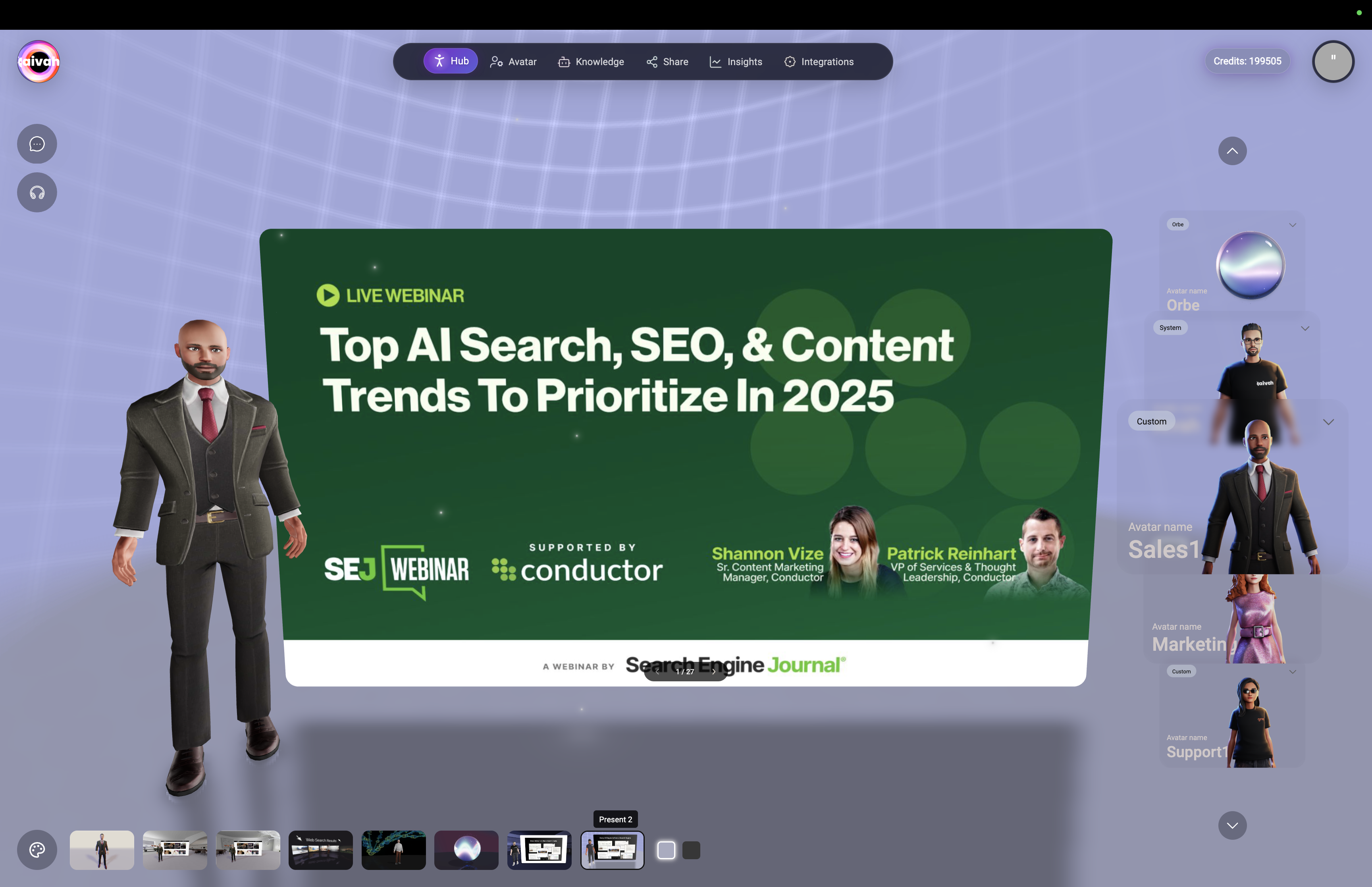 *Presentation Scene 2 offering alternative presentation layout and interaction style*
**Interactive Features:**
* **Alternative Layout**: Different presentation arrangement
* **PDF Display**: Same presentation capabilities with varied visual approach
* **Agent Navigation**: Intelligent slide control based on conversation
* **Enhanced Interaction**: Dynamic presentation flow with agent guidance
**Best Use Cases:**
* Extended presentation sessions
* Alternative presentation styles
* Varied visual preferences for different audiences
* Multiple presentation format support
## Scene Selection Strategy
### Choosing the Right Scene
**For General Conversations:**
* **Standard Scene**: Professional, distraction-free environment
**For Interactive Content:**
* **Zen Scenes**: When you need to display websites, videos, or presentations alongside conversation
**For Research & Information:**
* **Web Search Scene**: When agent will be performing web searches and you want immersive result display
**For Video Content:**
* **Video Wall**: When you want custom video backgrounds or branded content
**For Presentations:**
* **Presentation Scenes**: When using presentation agents with uploaded PDF materials
### Scene-Specific Agent Capabilities
**Presentation Scenes:**
* Agents can control slide progression
* Navigate to specific pages on request
* Dynamically advance slides based on conversation content
* Provide detailed explanations of slide materials
**Web Search Scene:**
* Immersive display of search results
* Interactive access to cited sources
* Visual representation of information sources
* Enhanced research and fact-checking experience
**Interactive Widget Scenes:**
* Display live website content from knowledge sources
* Play YouTube videos while maintaining conversation
* Show uploaded presentations with agent commentary
* Multi-media content integration
### Live Interactive Examples
**Zen Scene with Website Integration:**
*Presentation Scene 2 offering alternative presentation layout and interaction style*
**Interactive Features:**
* **Alternative Layout**: Different presentation arrangement
* **PDF Display**: Same presentation capabilities with varied visual approach
* **Agent Navigation**: Intelligent slide control based on conversation
* **Enhanced Interaction**: Dynamic presentation flow with agent guidance
**Best Use Cases:**
* Extended presentation sessions
* Alternative presentation styles
* Varied visual preferences for different audiences
* Multiple presentation format support
## Scene Selection Strategy
### Choosing the Right Scene
**For General Conversations:**
* **Standard Scene**: Professional, distraction-free environment
**For Interactive Content:**
* **Zen Scenes**: When you need to display websites, videos, or presentations alongside conversation
**For Research & Information:**
* **Web Search Scene**: When agent will be performing web searches and you want immersive result display
**For Video Content:**
* **Video Wall**: When you want custom video backgrounds or branded content
**For Presentations:**
* **Presentation Scenes**: When using presentation agents with uploaded PDF materials
### Scene-Specific Agent Capabilities
**Presentation Scenes:**
* Agents can control slide progression
* Navigate to specific pages on request
* Dynamically advance slides based on conversation content
* Provide detailed explanations of slide materials
**Web Search Scene:**
* Immersive display of search results
* Interactive access to cited sources
* Visual representation of information sources
* Enhanced research and fact-checking experience
**Interactive Widget Scenes:**
* Display live website content from knowledge sources
* Play YouTube videos while maintaining conversation
* Show uploaded presentations with agent commentary
* Multi-media content integration
### Live Interactive Examples
**Zen Scene with Website Integration:**
 *Zen Scene 1 showing live website integration with SEO webinar content displayed alongside avatar interaction*
**Immersive Web Search Experience:**
*Zen Scene 1 showing live website integration with SEO webinar content displayed alongside avatar interaction*
**Immersive Web Search Experience:**
 *Web Search scene showing immersive 3D widgets with search results spatially arranged around the agent for interactive exploration*
## Technical Considerations
### Performance Optimization
* **Standard Scene**: Fastest loading and performance
* **Interactive Scenes**: Require more processing power
* **Video Scenes**: Bandwidth intensive for large video files
* **Web Search**: Network dependent for real-time results
### Browser Compatibility
* **WebRTC Support**: Required for all scenes
* **Hardware Acceleration**: Recommended for smooth performance
* **Stable Internet**: Essential for interactive features
* **Modern Browsers**: Latest Chrome, Firefox, Safari, Edge supported
### Upload Requirements
* **Video Files**: MP4 format, under 50MB
* **Presentation Files**: PDF format for presentation agents
* **Network Speed**: Adequate bandwidth for file uploads and streaming
## Best Practices
### Scene Selection
* **Match Purpose**: Choose scenes that enhance your specific interaction goals
* **Consider Audience**: Professional vs. creative environments
* **Performance Awareness**: Balance visual appeal with loading speed
* **Content Integration**: Use interactive scenes when displaying supplementary content
### Interactive Features
* **Test Before Sharing**: Always test scene functionality before deploying shared agents
* **Content Preparation**: Have materials ready (videos, presentations) before switching scenes
* **Network Stability**: Ensure reliable connection for interactive elements
* **User Experience**: Consider how scene complexity affects user engagement
### Troubleshooting
* **Scene Loading Issues**: Refresh page or try different browser
* **Interactive Elements Not Working**: Check browser permissions and network connection
* **Video Upload Problems**: Verify file format (MP4) and size (under 50MB)
* **Widget Display Issues**: Ensure website sources are accessible and HTTPS enabled
Ready to explore immersive interactions? Select a scene that matches your conversation goals and enhance your avatar experience!
*Web Search scene showing immersive 3D widgets with search results spatially arranged around the agent for interactive exploration*
## Technical Considerations
### Performance Optimization
* **Standard Scene**: Fastest loading and performance
* **Interactive Scenes**: Require more processing power
* **Video Scenes**: Bandwidth intensive for large video files
* **Web Search**: Network dependent for real-time results
### Browser Compatibility
* **WebRTC Support**: Required for all scenes
* **Hardware Acceleration**: Recommended for smooth performance
* **Stable Internet**: Essential for interactive features
* **Modern Browsers**: Latest Chrome, Firefox, Safari, Edge supported
### Upload Requirements
* **Video Files**: MP4 format, under 50MB
* **Presentation Files**: PDF format for presentation agents
* **Network Speed**: Adequate bandwidth for file uploads and streaming
## Best Practices
### Scene Selection
* **Match Purpose**: Choose scenes that enhance your specific interaction goals
* **Consider Audience**: Professional vs. creative environments
* **Performance Awareness**: Balance visual appeal with loading speed
* **Content Integration**: Use interactive scenes when displaying supplementary content
### Interactive Features
* **Test Before Sharing**: Always test scene functionality before deploying shared agents
* **Content Preparation**: Have materials ready (videos, presentations) before switching scenes
* **Network Stability**: Ensure reliable connection for interactive elements
* **User Experience**: Consider how scene complexity affects user engagement
### Troubleshooting
* **Scene Loading Issues**: Refresh page or try different browser
* **Interactive Elements Not Working**: Check browser permissions and network connection
* **Video Upload Problems**: Verify file format (MP4) and size (under 50MB)
* **Widget Display Issues**: Ensure website sources are accessible and HTTPS enabled
Ready to explore immersive interactions? Select a scene that matches your conversation goals and enhance your avatar experience!