> ## Documentation Index
> Fetch the complete documentation index at: https://opinionai.mintlify.site/llms.txt
> Use this file to discover all available pages before exploring further.
# Twilio Phone Setup
> Twilio phone setup guide
# Twilio Phone Setup
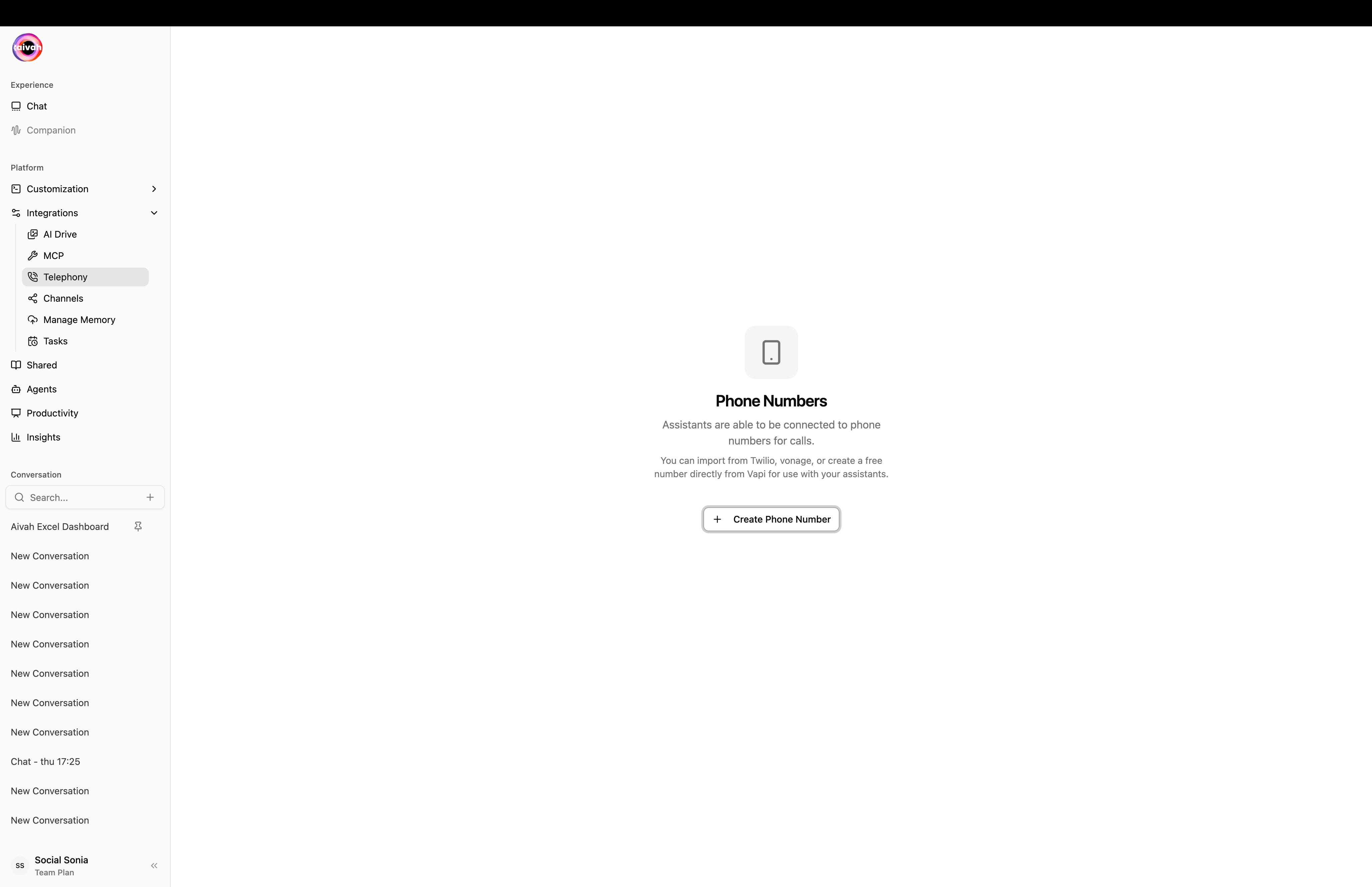
Connect your AIVAH agents to the Twilio telephony platform for seamless voice interactions. This guide will walk you through the complete setup process.
 ## 📋 Prerequisites
Before setting up Twilio integration, ensure you have:
* An active AIVAH account
* A Twilio account with phone number
* Twilio Account SID and Auth Token
* A Worker Agent configured with the knowledge sources you plan to expose
## 🎯 Configuration Steps
### Step 1: Agent Voice Selection
Configure your agent's voice from our selection of high-quality options:
## 📋 Prerequisites
Before setting up Twilio integration, ensure you have:
* An active AIVAH account
* A Twilio account with phone number
* Twilio Account SID and Auth Token
* A Worker Agent configured with the knowledge sources you plan to expose
## 🎯 Configuration Steps
### Step 1: Agent Voice Selection
Configure your agent's voice from our selection of high-quality options:
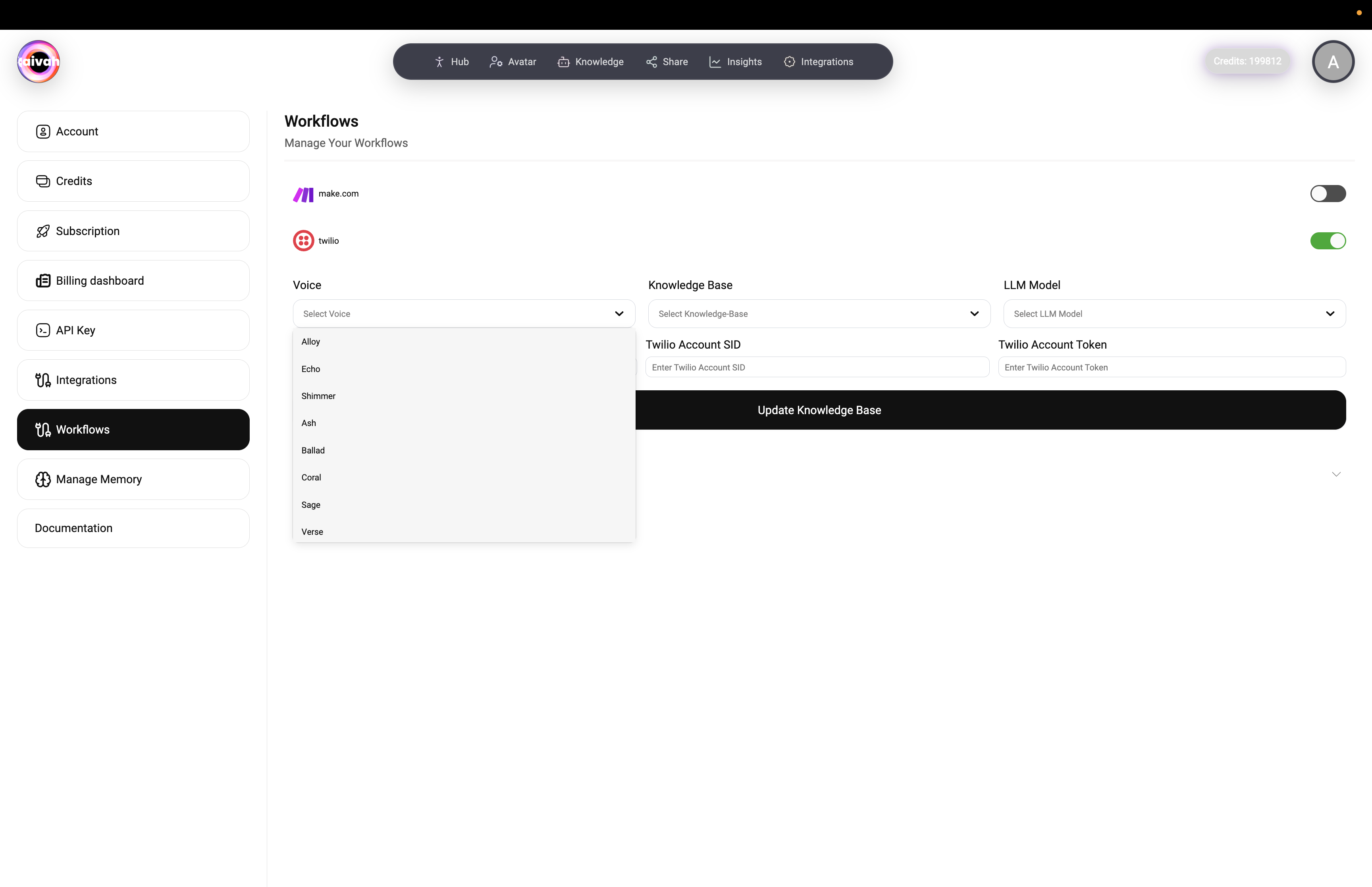 Available voice options depend on the active model family:
* **Gemini voices**: Sportsman, Customer support, Sarah, Brooke, Katie, Zemo, ajith, duaila, azj, ajz, sjl, brit, Swissen
* **OpenAI Realtime voices**: Alloy, Echo, Shimmer, Ash, Ballad, Coral, Sage, Verse, Cedar, Marin
* Voices refresh automatically when you switch providers in the LLM picker
### Step 2: Agent Selection
Choose the appropriate agent for your use case:
Available voice options depend on the active model family:
* **Gemini voices**: Sportsman, Customer support, Sarah, Brooke, Katie, Zemo, ajith, duaila, azj, ajz, sjl, brit, Swissen
* **OpenAI Realtime voices**: Alloy, Echo, Shimmer, Ash, Ballad, Coral, Sage, Verse, Cedar, Marin
* Voices refresh automatically when you switch providers in the LLM picker
### Step 2: Agent Selection
Choose the appropriate agent for your use case:
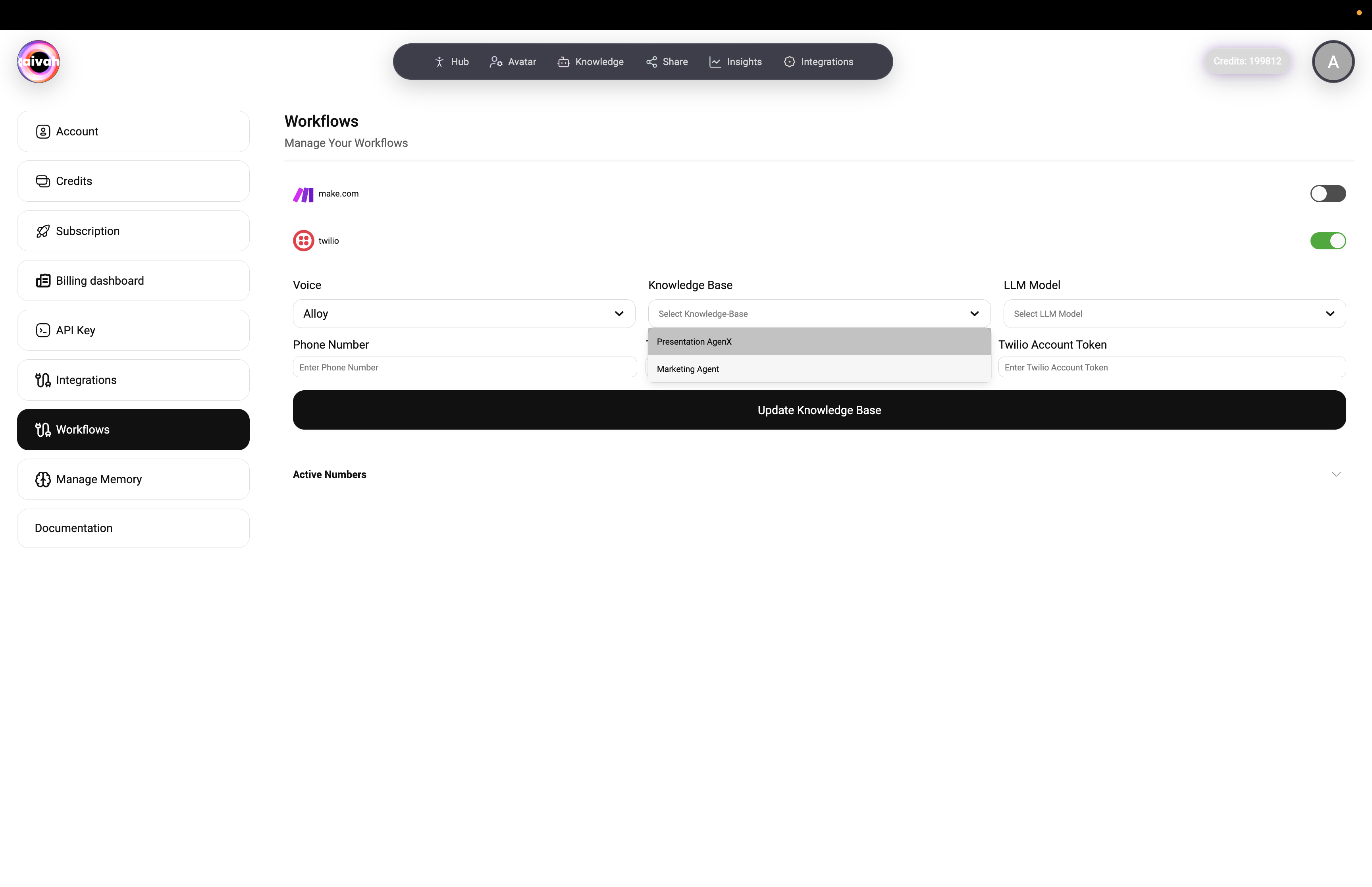 Options include:
* **Worker Agents**: Full-featured assistants for support, sales, or internal operations
* **Presenter Agents**: Specialized for guided demos and presentations while retaining full realtime capabilities
* **Custom Workers**: Your own Worker Agents with tailored knowledge and integrations
### Step 3: LLM Model Configuration
Select your preferred Large Language Model:
Options include:
* **Worker Agents**: Full-featured assistants for support, sales, or internal operations
* **Presenter Agents**: Specialized for guided demos and presentations while retaining full realtime capabilities
* **Custom Workers**: Your own Worker Agents with tailored knowledge and integrations
### Step 3: LLM Model Configuration
Select your preferred Large Language Model:
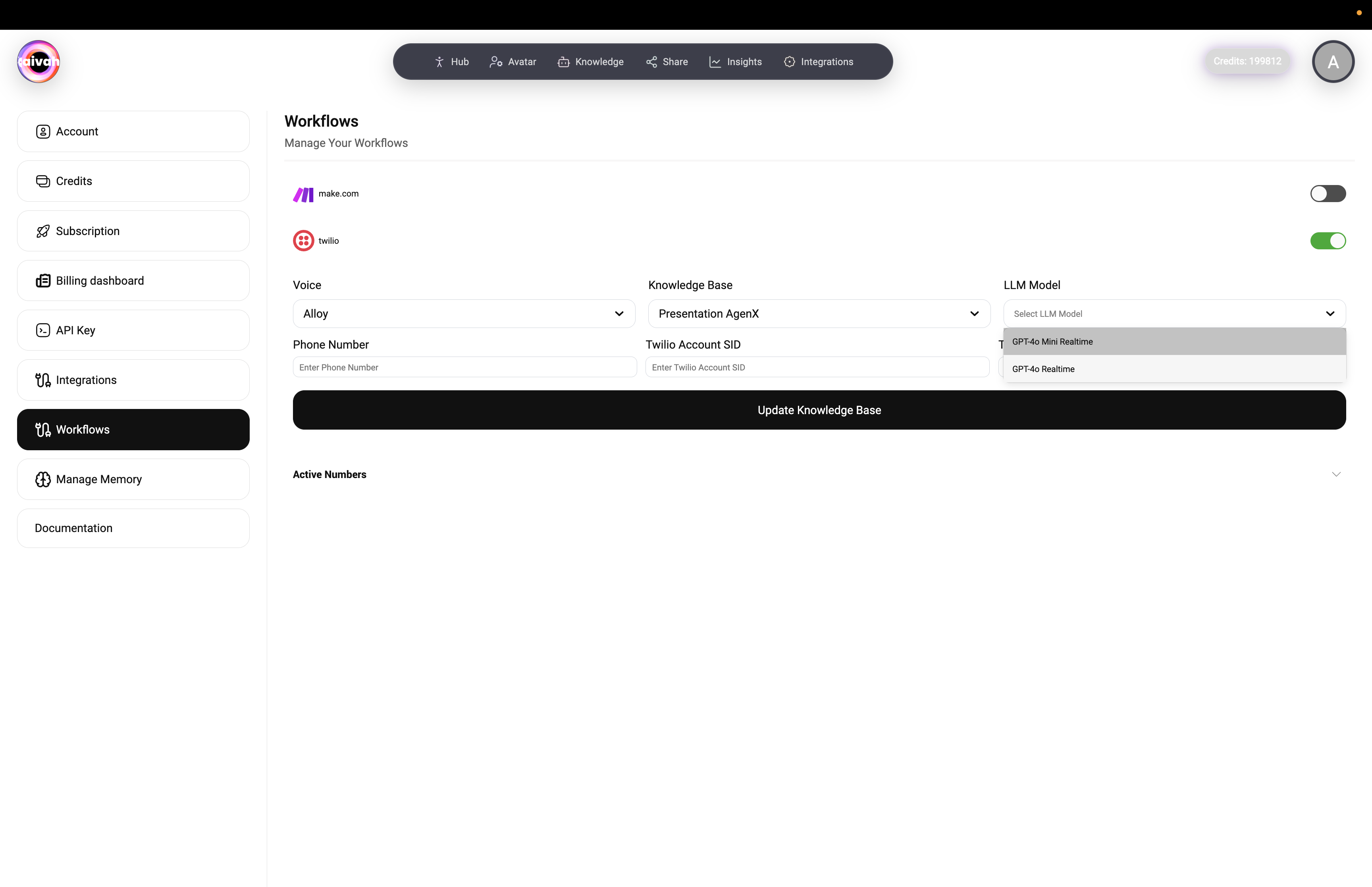 Available models span four provider families:
* **OpenAI**: GPT 4.1 mini, GPT 4.1, GPT 5, GPT 5 nano, GPT 5 mini
* **Gemini**: Gemini 2.5 Flash Lite, Gemini 2.5 Flash, Gemini 2.5 Pro
* **OpenAI Realtime**: GPT Realtime, GPT‑4o Realtime, GPT Realtime Mini for ultra-low latency voice calls
* **Groq hosted**: GPT OSS 20B, GPT OSS 120B, Qwen3‑32B, Moonshotai Kimi K2 when you need alternative model behavior
## Telephony Form Fields
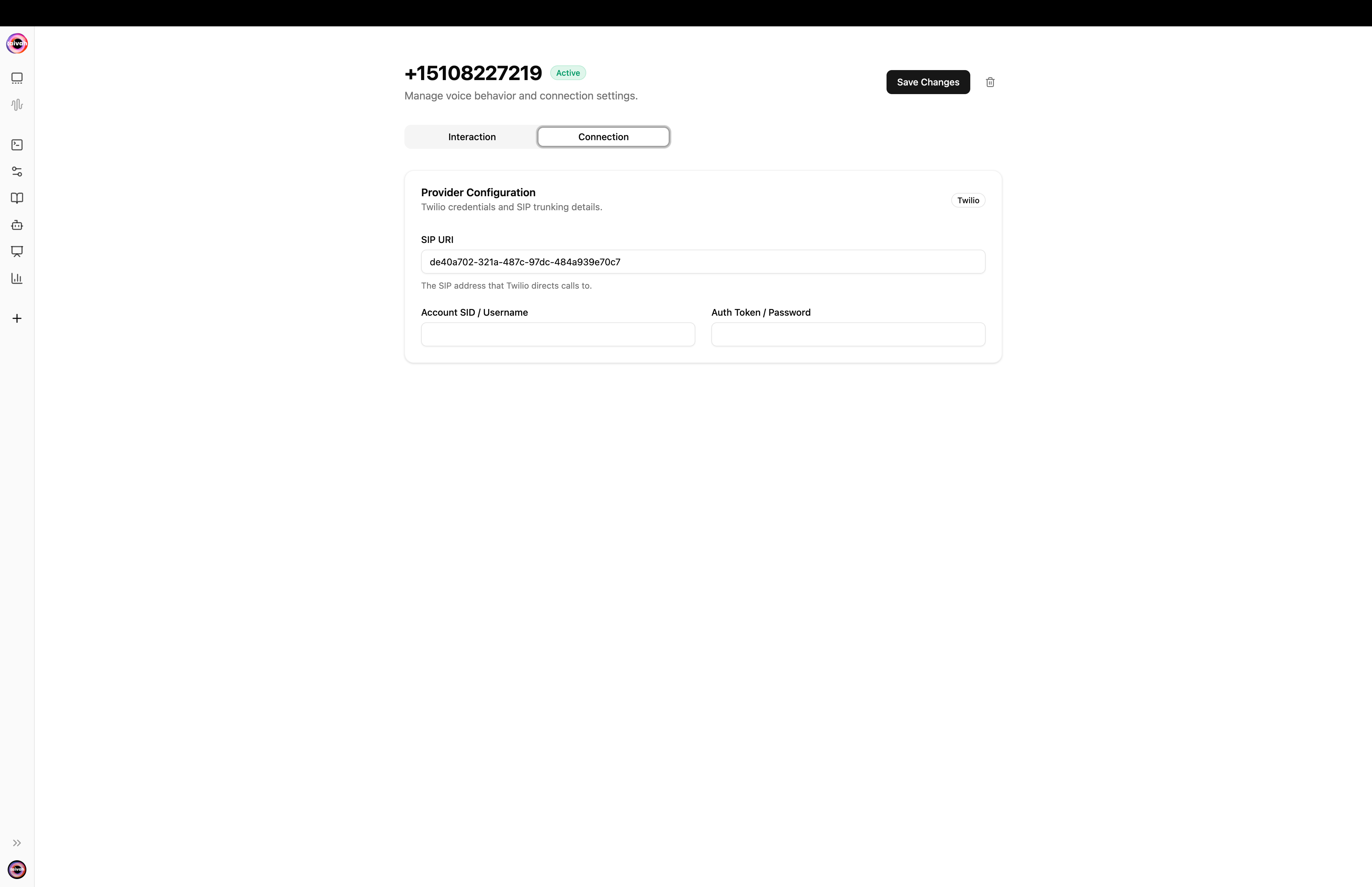
Once a phone number is added you'll land on its detail page. The configuration is split across two tabs: **Connection** and **Interaction**.
### Connection tab – wire up the number
| Field | Notes |
| -------------------------- | ----------------------------------------------------------------------------- |
| **SIP URI** | The Twilio termination SIP URI (or the Vapi URI when you mint a free number). |
| **Account SID / Username** | Your Twilio Account SID, or the username for a custom SIP trunk. |
| **Auth Token / Password** | Your Twilio Auth Token, or the password for a custom SIP trunk. |
Available models span four provider families:
* **OpenAI**: GPT 4.1 mini, GPT 4.1, GPT 5, GPT 5 nano, GPT 5 mini
* **Gemini**: Gemini 2.5 Flash Lite, Gemini 2.5 Flash, Gemini 2.5 Pro
* **OpenAI Realtime**: GPT Realtime, GPT‑4o Realtime, GPT Realtime Mini for ultra-low latency voice calls
* **Groq hosted**: GPT OSS 20B, GPT OSS 120B, Qwen3‑32B, Moonshotai Kimi K2 when you need alternative model behavior
## Telephony Form Fields
Once a phone number is added you'll land on its detail page. The configuration is split across two tabs: **Connection** and **Interaction**.
### Connection tab – wire up the number
| Field | Notes |
| -------------------------- | ----------------------------------------------------------------------------- |
| **SIP URI** | The Twilio termination SIP URI (or the Vapi URI when you mint a free number). |
| **Account SID / Username** | Your Twilio Account SID, or the username for a custom SIP trunk. |
| **Auth Token / Password** | Your Twilio Auth Token, or the password for a custom SIP trunk. |
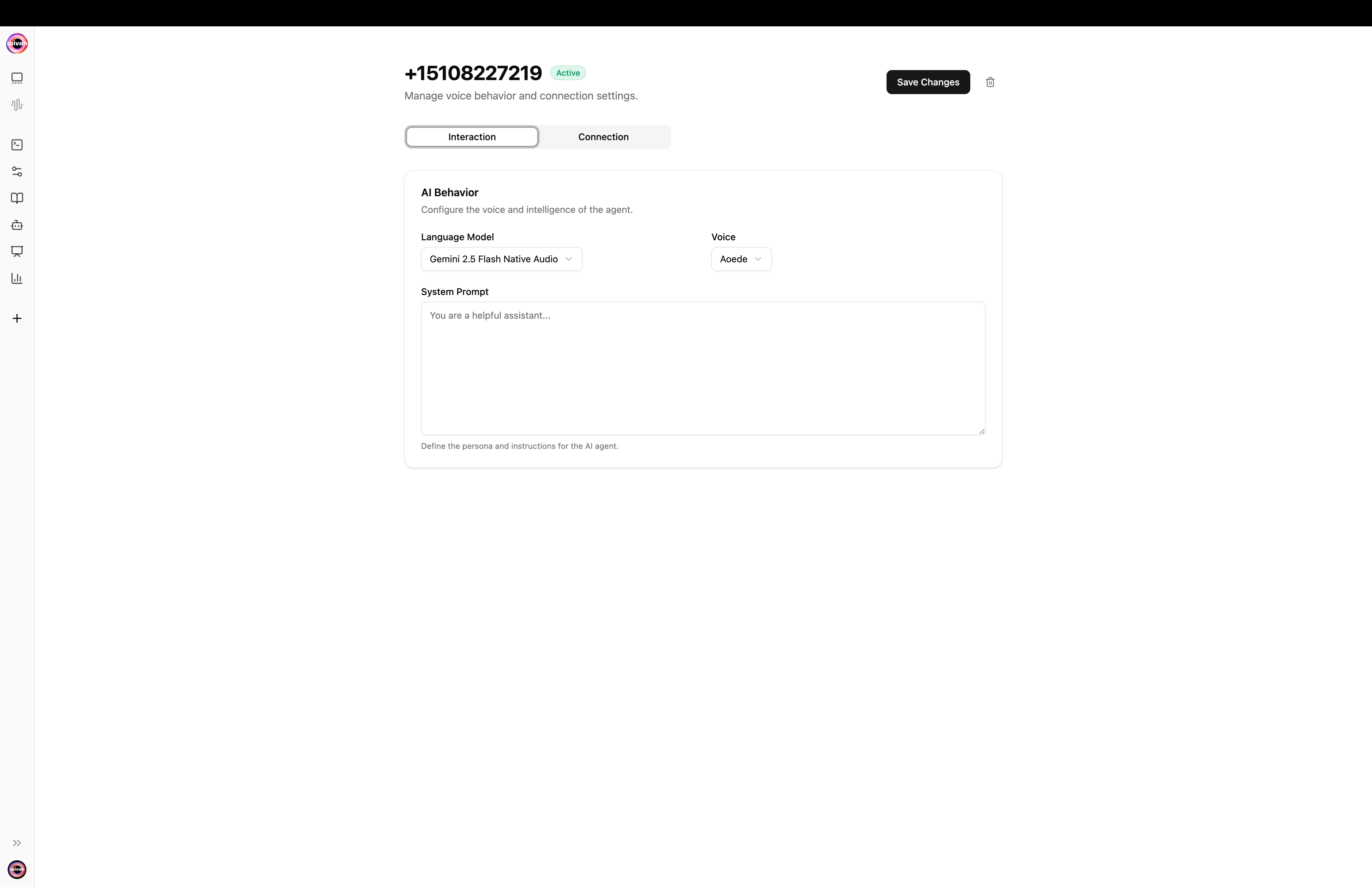
 ### Interaction tab – pick the brain and voice
| Field | Notes |
| ------------------ | ------------------------------------------------------------------------------------------------------------------------------------- |
| **Language Model** | The model used during the call. Voices are filtered automatically by provider, so the voice list refreshes when you change the model. |
| **Voice** | The voice the AI uses on the call. Includes Aivah's built-in voices and any [voice clones](/avatars/voices) you've added. |
| **System Prompt** | Override the agent persona and instructions during phone calls without changing the agent itself. |
### Interaction tab – pick the brain and voice
| Field | Notes |
| ------------------ | ------------------------------------------------------------------------------------------------------------------------------------- |
| **Language Model** | The model used during the call. Voices are filtered automatically by provider, so the voice list refreshes when you change the model. |
| **Voice** | The voice the AI uses on the call. Includes Aivah's built-in voices and any [voice clones](/avatars/voices) you've added. |
| **System Prompt** | Override the agent persona and instructions during phone calls without changing the agent itself. |
 Click **Save Changes** to persist. The page also lets you **delete** any saved phone number. After saving, calls placed to the number are routed through Aivah's media servers and answered by your agent.
## 🔧 Authentication Setup
### Twilio Credentials Configuration
1. **Twilio Account SID**: Enter your Account SID from Twilio Console
2. **Twilio Account Token**: Provide your Auth Token for secure authentication
### Phone Number Configuration
1. **Enter Phone Number**: Input the Twilio phone number you want to use
2. **Verify Configuration**: Ensure the number is active in your Twilio account
### Bring Your Own SIP Trunk *(optional)*
If you operate your own SIP infrastructure you can route inbound calls through a Twilio Elastic SIP Trunk:
1. **Twilio Termination SIP URI** – paste the termination URI from your Twilio SIP trunk configuration.
2. **Twilio Username / Password** – paste the SIP credentials Twilio shows when you create the trunk.
3. Aivah will use those credentials to authenticate against your trunk for every call.
Leave these fields blank if you want Aivah to route directly through the Twilio number.
### Custom Prompt for Phone Calls
The **Custom prompt** field lets you override the agent prompt specifically for telephony. Use it to:
* Add a phone-specific greeting ("You're an AI agent answering customer calls for…")
* Shorten responses for voice channels
* Constrain the agent to a narrower set of topics during calls
## ⚙️ Workflow Management
Navigate to the **Workflows** section to:
* Enable/disable make.com integration
* Configure Twilio workflow automation
* Set up call routing and handling rules
## 📞 Active Numbers Management
Monitor and manage your active phone numbers:
* View currently active Twilio numbers
* Check connection status
* Monitor usage and performance metrics
## 🚀 Testing Your Setup
1. **Save Configuration**: Click **Save Configuration** to persist your changes
2. **Test Call**: Place a test call to verify voice quality and response accuracy
3. **Monitor Performance**: Use [Insights → Call Logs](/insights/call-logs) to track call metrics and performance
## 📊 Best Practices
* **Voice Selection**: Choose voices that match your brand personality
* **Knowledge Optimization**: Keep your knowledge base updated and relevant
* **Testing**: Regular testing ensures optimal call quality
* **Monitoring**: Use analytics to continuously improve performance
## 🔍 Troubleshooting
**Common Issues:**
* **Authentication Errors**: Verify your Twilio credentials
* **Call Quality**: Check your internet connection and Twilio account status
* **Response Delays**: Consider switching to GPT Realtime Mini or Gemini 2.5 Flash Lite for faster responses
* **Voice Issues**: Test different voice options to find the best fit
Need help? Contact our support team for assistance with your Twilio integration.
Click **Save Changes** to persist. The page also lets you **delete** any saved phone number. After saving, calls placed to the number are routed through Aivah's media servers and answered by your agent.
## 🔧 Authentication Setup
### Twilio Credentials Configuration
1. **Twilio Account SID**: Enter your Account SID from Twilio Console
2. **Twilio Account Token**: Provide your Auth Token for secure authentication
### Phone Number Configuration
1. **Enter Phone Number**: Input the Twilio phone number you want to use
2. **Verify Configuration**: Ensure the number is active in your Twilio account
### Bring Your Own SIP Trunk *(optional)*
If you operate your own SIP infrastructure you can route inbound calls through a Twilio Elastic SIP Trunk:
1. **Twilio Termination SIP URI** – paste the termination URI from your Twilio SIP trunk configuration.
2. **Twilio Username / Password** – paste the SIP credentials Twilio shows when you create the trunk.
3. Aivah will use those credentials to authenticate against your trunk for every call.
Leave these fields blank if you want Aivah to route directly through the Twilio number.
### Custom Prompt for Phone Calls
The **Custom prompt** field lets you override the agent prompt specifically for telephony. Use it to:
* Add a phone-specific greeting ("You're an AI agent answering customer calls for…")
* Shorten responses for voice channels
* Constrain the agent to a narrower set of topics during calls
## ⚙️ Workflow Management
Navigate to the **Workflows** section to:
* Enable/disable make.com integration
* Configure Twilio workflow automation
* Set up call routing and handling rules
## 📞 Active Numbers Management
Monitor and manage your active phone numbers:
* View currently active Twilio numbers
* Check connection status
* Monitor usage and performance metrics
## 🚀 Testing Your Setup
1. **Save Configuration**: Click **Save Configuration** to persist your changes
2. **Test Call**: Place a test call to verify voice quality and response accuracy
3. **Monitor Performance**: Use [Insights → Call Logs](/insights/call-logs) to track call metrics and performance
## 📊 Best Practices
* **Voice Selection**: Choose voices that match your brand personality
* **Knowledge Optimization**: Keep your knowledge base updated and relevant
* **Testing**: Regular testing ensures optimal call quality
* **Monitoring**: Use analytics to continuously improve performance
## 🔍 Troubleshooting
**Common Issues:**
* **Authentication Errors**: Verify your Twilio credentials
* **Call Quality**: Check your internet connection and Twilio account status
* **Response Delays**: Consider switching to GPT Realtime Mini or Gemini 2.5 Flash Lite for faster responses
* **Voice Issues**: Test different voice options to find the best fit
Need help? Contact our support team for assistance with your Twilio integration.