> ## Documentation Index
> Fetch the complete documentation index at: https://opinionai.mintlify.site/llms.txt
> Use this file to discover all available pages before exploring further.
# MCP Tools
> MCP tools integration guide
# MCP Tools Integration
Connect your AIVAH agents to a wide range of applications and services using the Model Context Protocol (MCP). This powerful integration framework enables seamless connectivity with popular productivity tools and custom applications.
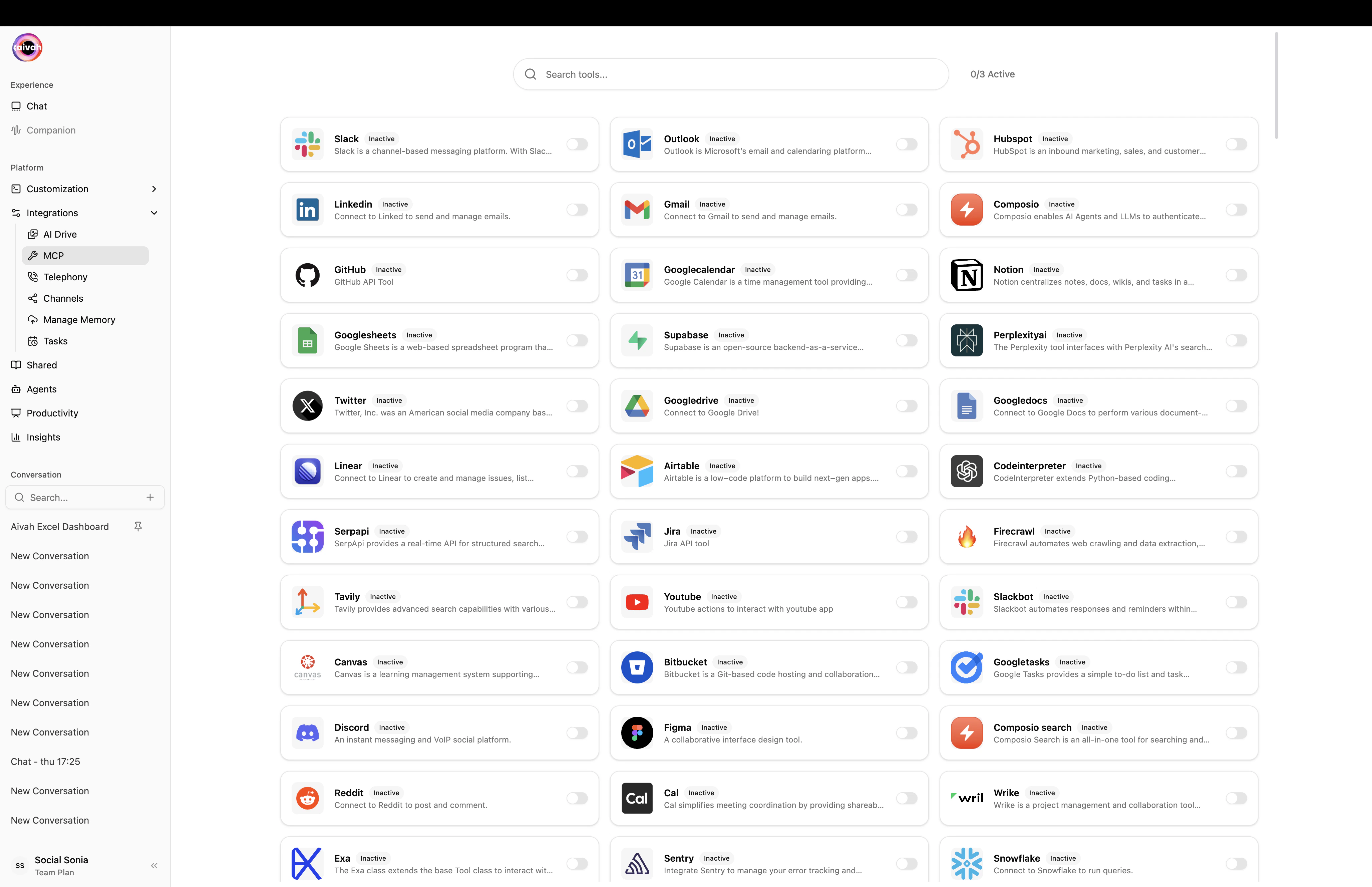 ## 🔌 Available Integrations
### Communication & Collaboration
* **Gmail**: Send and manage emails directly through your agent
* **Slack**: Post messages, manage channels, and interact with teams
* **Microsoft Outlook**: Email management and calendar integration
### Productivity & Project Management
* **Notion**: Create, read, and update Notion pages and databases
* **Google Calendar**: Schedule meetings and manage appointments
* **Google Sheets**: Read and write spreadsheet data
### Development & Code Management
* **GitHub**: Repository management, issue tracking, and code operations
* **Composio**: Advanced workflow automation and integration platform
### Document & File Management
* **Google Drive**: File storage, sharing, and document management
* **Airtable**: Database operations and record management
### Database & Backend Services
* **Supabase**: Database operations and backend functionality
* **Perplexity AI**: Enhanced search and research capabilities
### Design & Creative Tools
* **Figma**: Design file access and collaboration
* **DocuSign**: Document signing and workflow management
### Task & Time Management
* **Google Tasks**: Task creation and management
* **Calendly**: Meeting scheduling and availability management
### Social & Communication Platforms
* **Twitter**: Social media posting and engagement
* **Firecrawl**: Web scraping and data extraction
## 🔍 Finding Your Apps
## 🔌 Available Integrations
### Communication & Collaboration
* **Gmail**: Send and manage emails directly through your agent
* **Slack**: Post messages, manage channels, and interact with teams
* **Microsoft Outlook**: Email management and calendar integration
### Productivity & Project Management
* **Notion**: Create, read, and update Notion pages and databases
* **Google Calendar**: Schedule meetings and manage appointments
* **Google Sheets**: Read and write spreadsheet data
### Development & Code Management
* **GitHub**: Repository management, issue tracking, and code operations
* **Composio**: Advanced workflow automation and integration platform
### Document & File Management
* **Google Drive**: File storage, sharing, and document management
* **Airtable**: Database operations and record management
### Database & Backend Services
* **Supabase**: Database operations and backend functionality
* **Perplexity AI**: Enhanced search and research capabilities
### Design & Creative Tools
* **Figma**: Design file access and collaboration
* **DocuSign**: Document signing and workflow management
### Task & Time Management
* **Google Tasks**: Task creation and management
* **Calendly**: Meeting scheduling and availability management
### Social & Communication Platforms
* **Twitter**: Social media posting and engagement
* **Firecrawl**: Web scraping and data extraction
## 🔍 Finding Your Apps
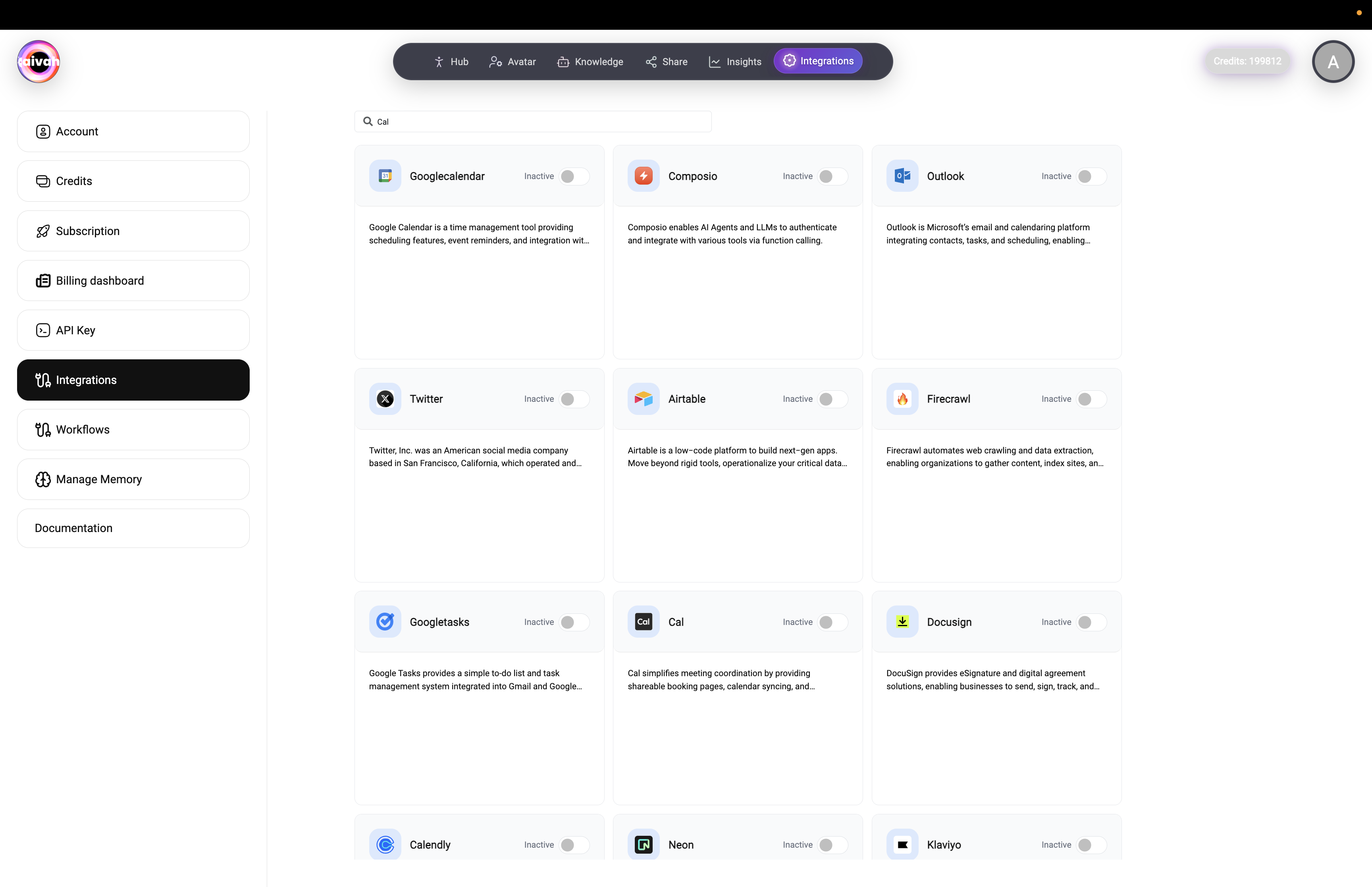 Use the search functionality to quickly find and configure your desired integrations:
1. **Search Interface**: Type "Cal" or any app name to filter available integrations
2. **Category Browsing**: Browse by categories like productivity, communication, or development
3. **Status Indicators**: See which integrations are active or inactive at a glance
## ⚙️ Integration Setup Process
### Step 1: Select Your Integration
1. Navigate to the **Integrations** section in your AIVAH dashboard
2. Use the search bar to find your desired app or browse by category
3. Click on the integration you want to configure
### Step 2: Authentication
Each integration requires specific authentication:
* **OAuth 2.0**: Most modern apps use OAuth for secure authentication
* **API Keys**: Some services require API key configuration
* **Webhook Setup**: Real-time integrations may need webhook configuration
### Step 3: Configure Permissions
Define what your agent can do with each integrated service:
* **Read Access**: View information from the connected app
* **Write Access**: Create and modify data in the connected app
* **Administrative Access**: Full management capabilities (where supported)
### Step 4: Test Connection
* **Connection Validation**: Verify authentication and permissions
* **Functionality Testing**: Test basic operations to ensure proper setup
* **Error Handling**: Review any connection issues and resolve them
## 🛠️ Popular Integration Examples
### Gmail Integration
**Capabilities:**
* Send emails on behalf of users
* Read and organize inbox messages
* Manage email labels and filters
* Schedule email sending
**Setup Requirements:**
* Google account authentication
* Gmail API access permissions
* Optional: Custom email templates
### Slack Integration
**Capabilities:**
* Post messages to channels
* Send direct messages
* Manage channel membership
* Upload files and attachments
**Setup Requirements:**
* Slack workspace permissions
* Bot token configuration
* Channel access permissions
### GitHub Integration
**Capabilities:**
* Repository management
* Issue creation and tracking
* Pull request operations
* Code review assistance
**Setup Requirements:**
* GitHub personal access token
* Repository access permissions
* Webhook configuration (optional)
### Notion Integration
**Capabilities:**
* Database operations
* Page creation and updates
* Content management
* Template utilization
**Setup Requirements:**
* Notion workspace access
* Integration permissions
* Database sharing settings
## 🔧 Advanced Configuration
### Custom MCP Servers
Build your own integrations using the MCP protocol:
1. **Protocol Implementation**: Follow MCP specification
2. **Server Development**: Create custom MCP server
3. **AIVAH Registration**: Register your custom server
4. **Testing & Deployment**: Test thoroughly before production use
### Workflow Automation
Combine multiple integrations for powerful workflows:
* **Multi-App Operations**: Chain operations across different apps
* **Conditional Logic**: Use if/then logic for smart automation
* **Data Synchronization**: Keep information synchronized across platforms
## 📊 Integration Management
### Monitoring & Analytics
* **Usage Statistics**: Track integration usage and performance
* **Error Reporting**: Monitor and resolve integration issues
* **Performance Metrics**: Measure response times and reliability
### Security & Compliance
* **Access Controls**: Manage who can use which integrations
* **Audit Logging**: Track all integration activities
* **Data Protection**: Ensure compliance with privacy regulations
## 🚀 Best Practices
### Security
* **Principle of Least Privilege**: Only grant necessary permissions
* **Regular Audits**: Review and update access permissions regularly
* **Token Rotation**: Regularly refresh API keys and tokens
### Performance
* **Rate Limiting**: Respect API rate limits for each service
* **Caching**: Use caching where appropriate to improve performance
* **Error Handling**: Implement robust error handling and retry logic
### User Experience
* **Clear Feedback**: Provide clear feedback on integration actions
* **Graceful Degradation**: Handle service outages gracefully
* **Documentation**: Keep integration capabilities well-documented
## 🆘 Troubleshooting
### Common Issues
* **Authentication Failures**: Check credentials and permissions
* **API Rate Limits**: Monitor usage and implement appropriate delays
* **Service Outages**: Have fallback strategies for service interruptions
* **Permission Errors**: Verify and update access permissions
### Support Resources
* **MCP Documentation**: Official protocol documentation
* **Community Forums**: Connect with other developers and users
* **Support Tickets**: Direct support for complex integration issues
* **Integration Guides**: Step-by-step guides for popular services
The MCP integration framework transforms your AIVAH agent into a powerful automation hub that can interact with virtually any modern application or service.
Use the search functionality to quickly find and configure your desired integrations:
1. **Search Interface**: Type "Cal" or any app name to filter available integrations
2. **Category Browsing**: Browse by categories like productivity, communication, or development
3. **Status Indicators**: See which integrations are active or inactive at a glance
## ⚙️ Integration Setup Process
### Step 1: Select Your Integration
1. Navigate to the **Integrations** section in your AIVAH dashboard
2. Use the search bar to find your desired app or browse by category
3. Click on the integration you want to configure
### Step 2: Authentication
Each integration requires specific authentication:
* **OAuth 2.0**: Most modern apps use OAuth for secure authentication
* **API Keys**: Some services require API key configuration
* **Webhook Setup**: Real-time integrations may need webhook configuration
### Step 3: Configure Permissions
Define what your agent can do with each integrated service:
* **Read Access**: View information from the connected app
* **Write Access**: Create and modify data in the connected app
* **Administrative Access**: Full management capabilities (where supported)
### Step 4: Test Connection
* **Connection Validation**: Verify authentication and permissions
* **Functionality Testing**: Test basic operations to ensure proper setup
* **Error Handling**: Review any connection issues and resolve them
## 🛠️ Popular Integration Examples
### Gmail Integration
**Capabilities:**
* Send emails on behalf of users
* Read and organize inbox messages
* Manage email labels and filters
* Schedule email sending
**Setup Requirements:**
* Google account authentication
* Gmail API access permissions
* Optional: Custom email templates
### Slack Integration
**Capabilities:**
* Post messages to channels
* Send direct messages
* Manage channel membership
* Upload files and attachments
**Setup Requirements:**
* Slack workspace permissions
* Bot token configuration
* Channel access permissions
### GitHub Integration
**Capabilities:**
* Repository management
* Issue creation and tracking
* Pull request operations
* Code review assistance
**Setup Requirements:**
* GitHub personal access token
* Repository access permissions
* Webhook configuration (optional)
### Notion Integration
**Capabilities:**
* Database operations
* Page creation and updates
* Content management
* Template utilization
**Setup Requirements:**
* Notion workspace access
* Integration permissions
* Database sharing settings
## 🔧 Advanced Configuration
### Custom MCP Servers
Build your own integrations using the MCP protocol:
1. **Protocol Implementation**: Follow MCP specification
2. **Server Development**: Create custom MCP server
3. **AIVAH Registration**: Register your custom server
4. **Testing & Deployment**: Test thoroughly before production use
### Workflow Automation
Combine multiple integrations for powerful workflows:
* **Multi-App Operations**: Chain operations across different apps
* **Conditional Logic**: Use if/then logic for smart automation
* **Data Synchronization**: Keep information synchronized across platforms
## 📊 Integration Management
### Monitoring & Analytics
* **Usage Statistics**: Track integration usage and performance
* **Error Reporting**: Monitor and resolve integration issues
* **Performance Metrics**: Measure response times and reliability
### Security & Compliance
* **Access Controls**: Manage who can use which integrations
* **Audit Logging**: Track all integration activities
* **Data Protection**: Ensure compliance with privacy regulations
## 🚀 Best Practices
### Security
* **Principle of Least Privilege**: Only grant necessary permissions
* **Regular Audits**: Review and update access permissions regularly
* **Token Rotation**: Regularly refresh API keys and tokens
### Performance
* **Rate Limiting**: Respect API rate limits for each service
* **Caching**: Use caching where appropriate to improve performance
* **Error Handling**: Implement robust error handling and retry logic
### User Experience
* **Clear Feedback**: Provide clear feedback on integration actions
* **Graceful Degradation**: Handle service outages gracefully
* **Documentation**: Keep integration capabilities well-documented
## 🆘 Troubleshooting
### Common Issues
* **Authentication Failures**: Check credentials and permissions
* **API Rate Limits**: Monitor usage and implement appropriate delays
* **Service Outages**: Have fallback strategies for service interruptions
* **Permission Errors**: Verify and update access permissions
### Support Resources
* **MCP Documentation**: Official protocol documentation
* **Community Forums**: Connect with other developers and users
* **Support Tickets**: Direct support for complex integration issues
* **Integration Guides**: Step-by-step guides for popular services
The MCP integration framework transforms your AIVAH agent into a powerful automation hub that can interact with virtually any modern application or service.